
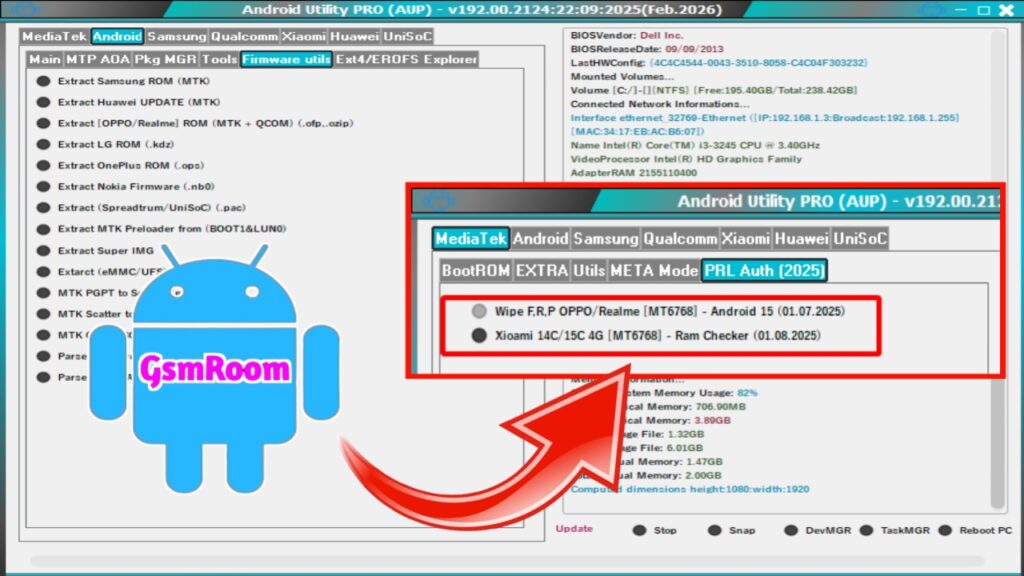
The demand for Android servicing tools continues to grow as smartphones become more advanced and security patches become stricter. To keep up with these challenges, the Android Utility Tool V192.00.2124 has been released with its latest 2025 updates. This free software provides an all-in-one solution for technicians, mobile repair shops, and advanced users who want to unlock, flash, repair, and customize Android devices safely and efficiently.
In this article, we will walk you through the features, improvements, system requirements, supported functions, and download process of the Android Utility Tool V192.00.2124 (2025 edition).
What is Android Utility Tool V192.00.2124?
The Android Utility Tool (AUT) is a multi-functional mobile service application designed to perform advanced operations on a wide variety of Android devices. The V192.00.2124 version, released in September 2025, is packed with new functions, improved algorithms, and better device support.
Whether you need to bypass FRP, repair IMEI, unlock bootloaders, or flash firmware, this tool offers reliable performance with a simple, user-friendly interface.
Key Features of Android Utility Tool V192.00.2124
- FRP Bypass (Google Account Removal) – Remove Factory Reset Protection quickly and safely.
- Bootloader Unlock & Relock – Enable or disable bootloader lock with a single click.
- Firmware Flashing – Flash stock or custom ROMs on supported devices.
- IMEI Repair & Write – Restore corrupted or invalid IMEI numbers.
- Pattern/PIN/Password Unlock – Bypass screen locks without data loss (on supported devices).
- Support for Multiple Chipsets – Qualcomm, MediaTek, Exynos, and Unisoc supported.
- ADB & Fastboot Functions – Perform advanced tasks with ease.
- Rooting Support – Safely root compatible devices.
- EFS Backup & Restore – Protect critical partitions from data loss.
- Reboot Options – Reboot devices into recovery, bootloader, or EDL mode directly.
- Disable/Enable OTA Updates – Manage system updates easily.
Latest Updates in 2025 Release
- Expanded support for Android 14 & 15 builds.
- Optimized Qualcomm flashing algorithms for faster performance.
- Enhanced FRP bypass success rates on Samsung, Oppo, and Vivo devices.
- Improved MediaTek authentication bypass for the latest chipsets.
- Fixed bootloop issues during firmware flashing.
- Updated USB driver library for better device recognition.
- Cleaner and more user-friendly interface for quick navigation.
System Requirements
Android Utility Tool V192.00.2124, make sure your system meets the following requirements:
- Operating System: Windows 7, 8, 10, or 11 (32-bit/64-bit)
- Processor: Intel/AMD Dual Core or higher
- RAM: Minimum 4GB (8GB recommended)
- Hard Disk: At least 500MB free space
- USB Cable: Original or high-quality cable for a stable connection
- Drivers: Latest Android USB drivers installed
How to Download Android Utility Tool V192.00.2124 FREE (2025)
Follow
- Visit a trusted source that provides the latest version of the tool.
- Find Android Utility Tool V192.00.2124 (2025 update).
- Click on the Download button to save the setup file.
- Extract the ZIP file using WinRAR or 7-Zip.
- Open the folder and run the installation file as Administrator.
How to Use Android Utility Tool V192.00.2124
Once installed, using the tool is very straightforward:
- Install required drivers from the drivers folder.
- Run the software as administrator.
- Connect your Android device in ADB, Fastboot, or EDL mode (depending on the operation).
- Choose the function you want (FRP Bypass, Flash, Unlock, IMEI Repair, etc.).
- Click Start and let the tool complete the process.
- Reboot your device to verify changes.
Supported Devices
Android Utility Tool V192.00.2124 supports thousands of devices
- Samsung – Galaxy S, Note, A, M, and Z series
- Xiaomi / Redmi / Poco – All Snapdragon and MediaTek models
- Oppo, Realme, Vivo – Full support for Android 13/14 devices
- Huawei & Honor – Support up to latest EMUI updates
- OnePlus – All models including OxygenOS 14 builds
- Nokia, Motorola, Sony, Asus, and LG – Wide support across models
Why Choose Android Utility Tool V192.00.2124?
- Free to use – No activation or license required.
- All-in-one solution – Unlock, repair, flash, and root with a single tool.
- High success rate – Optimized algorithms reduce risks.
- Beginner-friendly – Simple dashboard for easy navigation.
- Regularly updated – Keeps up with the latest Android devices and patches.
Precautions Before Using the Tool
- Always backup your important data before using.
- Ensure your phone has at least 50% battery charge.
- Use only original or high-quality USB cables.
- Follow instructions carefully to avoid device issues.
- Only use the tool on supported devices to prevent errors.
Conclusion
The Android Utility Tool V192.00.2124 Latest Updates FREE Download (2025) is an essential solution for Android users and technicians who need an efficient, reliable, and versatile tool. With its wide range of features, support for the latest Android versions, and beginner-friendly design, this release is a complete package for mobile servicing.
Whether you’re unlocking, repairing, or flashing your Android phone, this tool provides everything you need in one lightweight application.
Android Utility Tool :- [ Link ]