
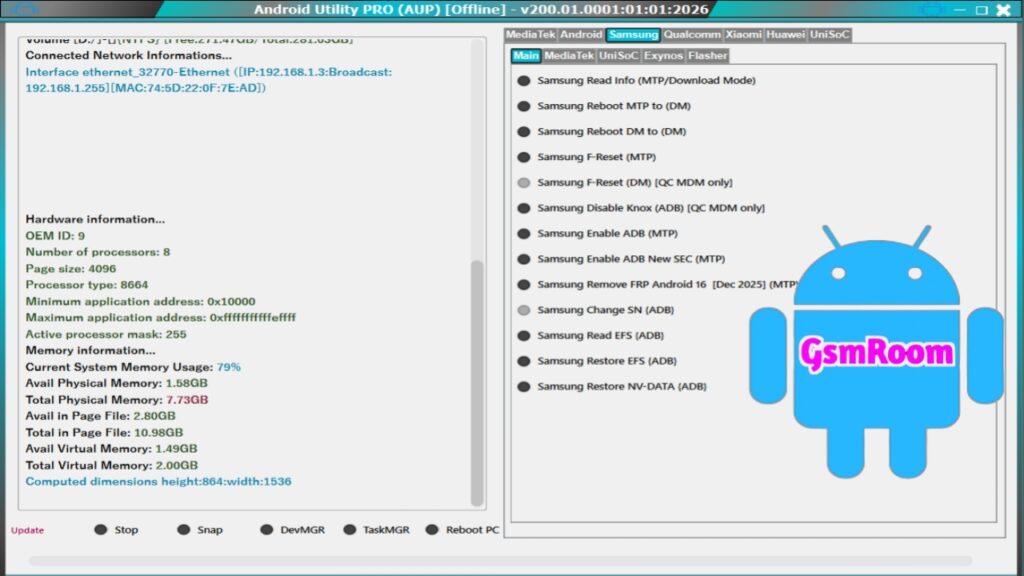
Android Utility Tool V200.01 is a Windows-based Android servicing software used by mobile technicians, repair shops, and advanced users to perform software-level repair and maintenance on Android smartphones and tablets. The 2026 update (V200.01) is an offline build, meaning it can be installed and used without needing a continuous internet connection once installed.
This version focuses on stability, device compatibility, and offline functionality — making it useful in scenarios where internet access is limited.
🧰 What the Tool Is Used For
Android Utility Tool is designed to help with a variety of Android device servicing tasks, including:
✔ FRP Bypass (Factory Reset Protection)
✔ Device Diagnostics & Information
✔ ADB, Fastboot & Bootloader Tools
✔ Firmware Flashing Support
✔ Soft Reset / Repair Functions
✔ Chipset Detection & Compatibility
✔ Offline Utility Operations (after install)
Because it supports offline use, this version is preferred by many technicians who work without stable internet access during repairs or field service work.
🆕 What’s New in V200.01 (2026)
The update centers on three core improvements:
📌 1. Offline Compatibility
After installation, the tool does not require internet authentication or server checks to run most core features.
→ Easier for repair centers without stable internet.
⚡ 2. Improved Device Detection
Better recognition of connected Android phones (Samsung, Xiaomi, Motorola, Oppo, Realme, and more) for diagnostic and repair tasks.
🔄 3. Expanded Chipset Support
Enhanced support for:
- Qualcomm (EDL/ADB/Fastboot)
- MediaTek (Meta/BROM)
- UniSoC / Spreadtrum
… and other popular Android chipsets.
📋 Key Features of Android Utility Tool V200.01
Here’s what technicians most commonly use this tool for:
📱 FRP Bypass / Google Lock Removal
Bypasses Factory Reset Protection (FRP) on supported devices — especially when normal software methods fail.
📊 Device Information & Diagnostics
Reads:
- Model name
- Firmware version
- Security patch level
- Hardware details
🔌 ADB / Fastboot Tools
Provides quick access to:
- Reboot bootloader
- Reboot recovery
- ADB command features
🔧 Firmware Flashing Support
Assists with flashing firmware parts using:
- Fastboot mode
- EDL/Download mode (Qualcomm)
- Meta/BROM mode (MediaTek)
(Note: Advanced full flash may depend on additional modules or drivers)
🔍 Chipset Compatibility
Works with phones powered by:
- Qualcomm Snapdragon
- MediaTek Helio/Dimensity
- UniSoC / Spreadtrum
… expanding repair system coverage.
💾 Offline Functionality
Once installed, the tool works entirely offline for most functions — no internet needed to use core tools.
📱 Supported Android Brands
Android Utility Tool V200.01 supports many Android brands, including:
✔ Samsung
✔ Xiaomi / Redmi / POCO
✔ Oppo / Realme
✔ Vivo / iQOO
✔ Motorola
✔ Nokia
✔ Tecno / Infinix
✔ And many more modern Android-based devices
Note: Support for specific features (like FRP bypass) may vary by device model and security level.
💻 System Requirements
To run Android Utility Tool V200.01 on your PC:
✔ Operating System: Windows 7 / 8 / 10 / 11 (recommended 64-bit)
✔ USB Drivers Installed: Qualcomm, MediaTek, Samsung ADB/USB drivers
✔ ADB/Fastboot Drivers for device detection
✔ USB Cable: Good quality for stable connection
📦 How to Install & Use (General Guide)
- Download the Android Utility Tool V200.01 package from a trusted source.
- Extract the ZIP/RAR file to your PC (e.g., Desktop).
- Disable Antivirus temporarily (some tools are falsely flagged).
- Run
AndroidUtility.exeas Administrator to launch the tool. - Install required drivers if not already installed.
- Connect the Android device via USB in the correct mode (ADB, Fastboot, EDL, etc.).
- Select the feature you need (FRP bypass, info, flash, etc.)
⚠️ Tip: If a password is required to extract the ZIP, many versions use common passwords like mfdl (but the exact password can vary by distribution).
⚠️ Safety & Legal Notes
✔ Always scan downloaded files with reliable antivirus software before opening.
✔ Only perform FRP bypass or repair operations with the owner’s permission. Unauthorized unlocking or bypassing security protections may be illegal in some regions.
✔ Use official OEM tools where possible for critical operations (e.g., Samsung Odin, Xiaomi MiFlash, etc.).
📌 Summary
Android Utility Tool V200.01 – Latest Version (New 2026) is a comprehensive Android repair utility designed for offline use after installation. It supports device diagnostics, FRP bypass, ADB/Fastboot access, chipset detection (Qualcomm/MediaTek/UniSoC), and basic firmware operations — all in a Windows-based interface that works without continuous internet access.
If you want safe download links or step-by-step installation instructions for this version, just let me know!
Pasword – mfdl