
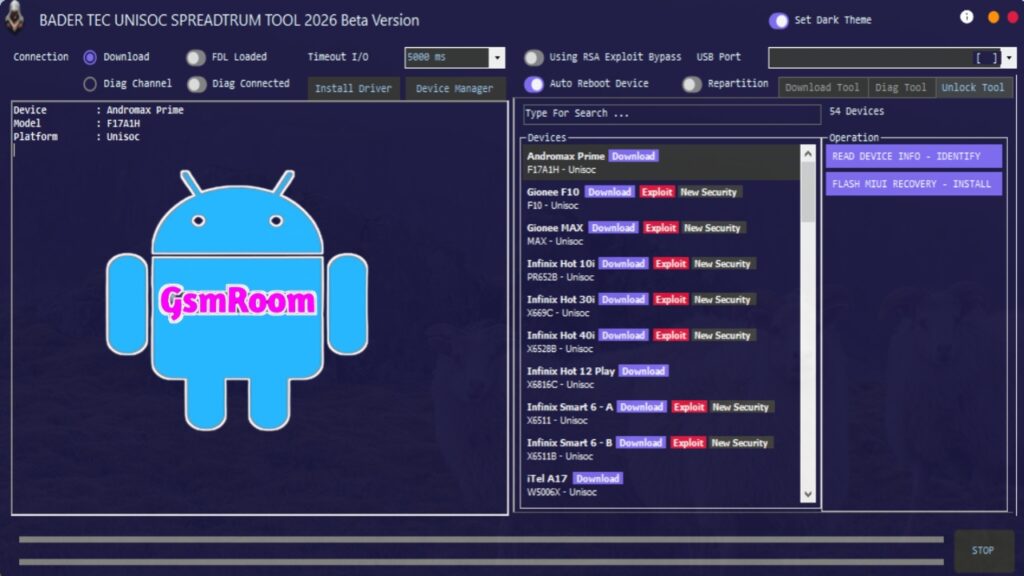
“BADER TEC UNISOC Spreadtrum Tool 2026 Beta” is reported by some mobile software communities as a specialized repair and flashing utility designed for Unisoc (Spreadtrum) chipset-based smartphones and tablets. Tools like this are typically used by technicians for low-level device servicing — including firmware flashing, unbricking, FRP reset, and network unlock tasks for devices powered by Spreadtrum/Unisoc processors.
However, as of the latest available information, there is no official “BADER TEC” branded Unisoc tool supported or distributed by Unisoc Communications itself. Most publicly verified tools for Unisoc chipsets come from Unisoc or large repair tool teams such as SPD Flash Tool or Hydra SPRD/Unisoc Tool.
🔧 What Unisoc/Spreadtrum Tools Typically Do
Repair tools for Unisoc / Spreadtrum chipsets generally provide the following capabilities:
🔹 Firmware Flashing
Install, update, or restore stock firmware (often .PAC based) on supported devices — a method used to fix software issues such as boot loops or corrupted systems.
🔹 Dead Phone Recovery
Repair devices that won’t boot or are “dead” by reflashing the core software or recovery partitions.
🔹 FRP & Screen Lock Reset
Erase or bypass Factory Reset Protection (FRP) and other security locks when normal service modes aren’t available.
🔹 Backup / Restore Operations
Many Unisoc tools allow reading and backing up partitions such as firmware, NVRAM, and user data before modification.
🔹 IMEI & Network Fixes (tool specific)
Some third-party Unisoc tools include network and IMEI repair capabilities, though this is more common in paid or specialized boxes.
🛠 Official & Known Tools for Unisoc / Spreadtrum Chipsets
Here are the widely recognized utilities used by technicians, which offer similar functionality to what Bader Tec tools claim to provide:
📌 SPD Flash Tool (Spreadtrum/Unisoc Official Utility)
- Developed by Unisoc Communications.
- Used for flashing firmware on devices with Spreadtrum/Unisoc chipsets.
- Supports PAC firmware, dead boot repair, and stock ROM installation.
- Free for Windows PCs.
📌 SPD Upgrade / Factory / Research Tools
- Variants of the official flash tool designed for specific tasks: firmware upgrade, deep configuration, or advanced memory access.
- Supported versions like R27.24.2301 are available for download.
📌 Hydra SPRD/Unisoc Tool
- Third-party repair tool that adds Unified features like read/write firmware, FRP reset, backup/restore, and IMEI/DIAG services for many Spreadtrum phones.
📌 UMT Unisoc Module
- Another Windows-compatible utility to flash PAC/XML firmware, remove locks, and repair IMEI on Unisoc devices.
These tools are widely used and documented — unlike Bader Tec Tool, which does not have a verifiable official presence as of 2026.
⚠️ Important Notes for Tools Like “BADER TEC UNISOC SPREADTRUM TOOL 2026 Beta”
- No Official Source Name:
There is no official Unisoc/Spreadtrum release named “Bader Tec Tool” from Unisoc Communications or major mobile repair vendors. Verified tools have clear publisher information. - Beta Versions Are Unverified:
Many community “beta” tools circulate online — use caution and always scan files for malware before running them on a Windows PC. - Use Recognized Alternatives:
Official tools such as SPD Flash Tool or widely accepted third-party utilities (Hydra, UMT modules, etc.) provide safer and better documented repair capabilities. - Drivers Required:
All Unisoc/Spreadtrum utilities require the correct SPD/UniSoc drivers installed on your computer for device detection and interaction.
📈 Recommended Usage (Generic Steps)
If you are looking for a tool to service Unisoc-based devices, a typical workflow with verified utilities looks like this:
- Install SPD/UniSoc USB Drivers on your Windows system.
- Download a reputable tool (e.g., SPD Flash Tool R27.24.2301).
- Download firmware (.PAC) matching your specific device model.
- Connect the device while powered off (often in a special download or preloader mode).
- Load the firmware into the tool and start the flash or repair process.
- Wait for the process to finish and then reboot the device.
📌 Summary
“BADER TEC UNISOC Spreadtrum Tool 2026 Beta” is referenced in some online communities as a specialized repair tool for Unisoc/Spreadtrum chipsets, but it is not an officially documented or widely recognized utility from Unisoc or major developers. Instead, tools like SPD Flash Tool, SPD Upgrade/Factory/Research Tools, Hydra SPRD/Unisoc, and UMT Unisoc Module are established options for firmware flashing, FRP reset, FRP removal, and other deep system repairs on Unisoc-powered devices.
Password : Bader Tec