
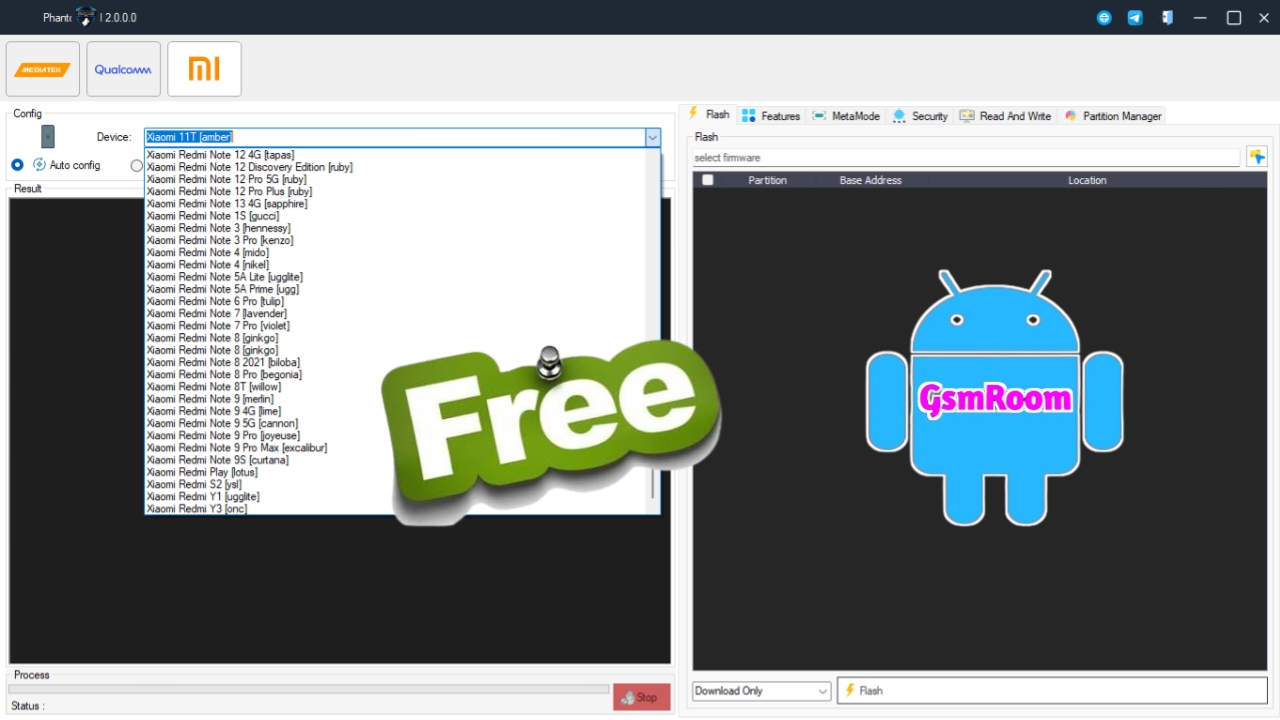
Phantom Tool V2.0 is the newest, most advanced, and completely login-free mobile servicing tool designed for Android smartphones. Whether you are repairing, unlocking, flashing, or optimizing phones, this updated 2025 version makes the entire process faster, easier, and more stable. With its powerful new algorithms, improved chipset support, and zero-login requirement, Phantom Tool V2.0 has quickly become one of the best free service tools available for technicians and mobile repair shops.
This detailed guide covers everything you need to know about Phantom Tool V2.0 Latest Update No Need Login Free Download—including features, supported devices, installation, and usage tutorials.
What Is Phantom Tool V2.0?
Phantom Tool V2.0 is a universal Android repair software that supports flashing, FRP removal, unlocking, factory reset, partition repair, and advanced diagnostic functions. Unlike other service tools that require server login or paid credits, this newest version operates fully offline, making it 100% free and highly efficient.
The tool supports thousands of smartphones from major brands such as Samsung, Xiaomi, Oppo, Vivo, Realme, Tecno, Infinix, OnePlus, Huawei, and others. With better support for MTK, Qualcomm, and SPD chipsets, Phantom Tool V2.0 provides a complete repair solution for technicians.
Key Features of Phantom Tool V2.0 (2025 Edition)
1. No Login Required
- Completely offline
- No username or password
- No credits, no tokens, no subscription
- Just download and use instantly
2. Flashing & Firmware Installation
The tool supports:
- Full ROM flashing
- Scatter flash (MTK)
- Qualcomm flash (EDL mode)
- SPD firmware installation
- Fastboot flashing
Perfect for fixing:
- Bootloops
- Stuck-on-logo devices
- Dead/soft-bricked phones
3. FRP Bypass (Android 8–14)
Supports:
- MTK FRP Bypass
- Qualcomm FRP Reset
- SPD FRP Removal
- Samsung FRP via ADB & MTP
- Xiaomi FRP/MI Account disable (where allowed)
4. Unlocking Features
- Pattern unlock
- PIN/Password reset
- Userdata wipe
- Bootloader unlock
- Relock functions
- Remove demo mode (Oppo/Vivo/Realme)
5. IMEI & Network Repair Tools
(Where legally allowed)
- Repair IMEI
- Baseband recovery
- NV/EFS repair
- WiFi & Bluetooth address fix
6.Supports Latest 2024–2025 Chipsets
- MediaTek Helio & Dimensity
- Qualcomm Snapdragon
- Spreadtrum/Unisoc
- Exynos (limited support)
Supported Brands (Updated 2025)
✓ Samsung
Flash, FRP, Unlock, Factory Reset, ADB Fix
✓ Xiaomi / Redmi / Poco
Fastboot flashing, FRP, Mi Account restore
✓ Oppo / Realme
Demo mode removal, FRP, pattern reset
✓ Vivo
Account reset, pattern removal, firmware repair
✓ Tecno / Infinix
SPD + MTK repair functions
✓ OnePlus
Fastboot repair, FRP, bootloader functions
✓ Huawei / Honor
Fastboot repair & reset options
System Requirements for Phantom Tool V2.0
Operating System
- Windows 7
- Windows 8
- Windows 10
- Windows 11 (recommended)
Minimum Hardware Requirements
- CPU: Intel Core i3 or higher
- RAM: 4 GB minimum (8 GB recommended)
- Storage: 500 MB free space
- USB: 2.0 / 3.0 high-speed port
Phantom Tool V2.0 Latest Update – No Login Free Download
Package Includes:
- Phantom Tool V2.0 Offline Installer
- ADB + Fastboot drivers
- MTK, Qualcomm, SPD drivers
- Flashing script modules
- Complete user manual
Important: Some antivirus tools may flag repair software. Disable protection temporarily to install.
How to Install Phantom Tool V2.0 (Step-by-Step)
Step 1 – Extract the ZIP File
Use WinRAR or 7-Zip.
Step 2 – Install All Required Drivers
Open the “Drivers” folder and install:
- MTK Drivers
- Qualcomm Drivers
- SPD Drivers
- ADB & Fastboot Drivers
Step 3 – Run the Setup
Open PhantomTool_V2.0.exe
Step 4 – Launch the Program
No login required—tool opens instantly.
How to Use Phantom Tool V2.0
1. FRP Removal
- Select chipset
- Connect phone
- Click “Remove FRP”
- Wait for success message
2. Flashing Firmware
- Load firmware (scatter, OFP, CPB, XML, etc.)
- Put device in correct mode
- Click Start Flash
3. Pattern/PIN Unlock
- Connect device
- Choose “Remove Lock”
- Execute command
4. Boot Repair
- Choose recovery file
- Flash boot.img
- Reboot device
5. Fix Softbrick
- Load stock ROM
- Flash using EDL/Fastboot
- Reboot
Common Problems & Solutions
Device Not Detected
- Reinstall drivers
- Change USB cable
- Use back USB port
FRP Not Working
- Switch to alternative FRP method
- Reboot device to bootloader or recovery
Flashing Failed
- Use correct firmware version
- Check bootloader status
Tool Crashes
- Run as Administrator
- Turn off antivirus
- Install .NET Framework
Why Phantom Tool V2.0 Is the Best Free Tool of 2025
✔ 100% Free
✔ No login required
✔ Offline mode
✔ Supports Android 8–14
✔ Powerful flashing engine
✔ Multi-chipset support
✔ Technician-level features
✔ Updated regularly
Phantom Tool V2.0 offers professional-level performance without any subscription or server limitations.