
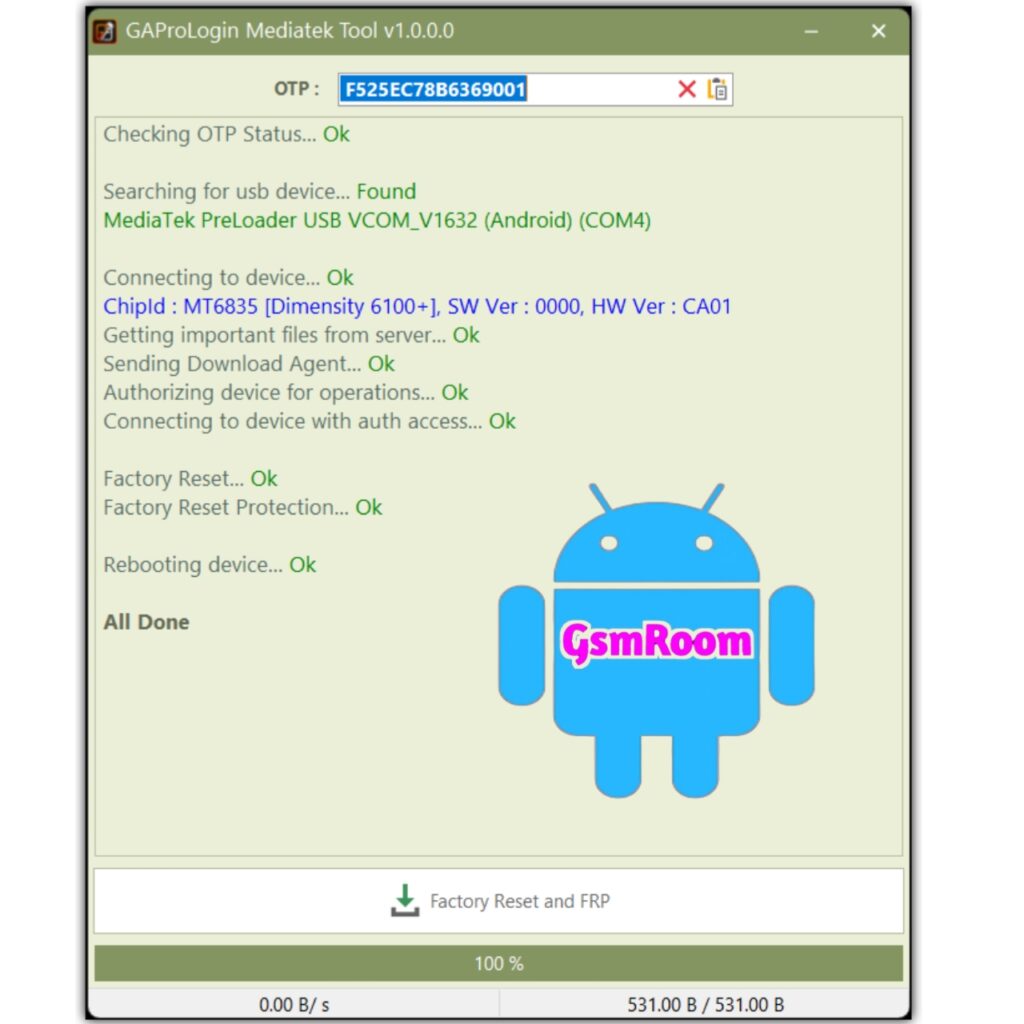
GAPRO Login Tool is a Windows-based servicing utility used by mobile technicians and advanced users to perform software maintenance tasks on Android devices. The name “GAPRO” typically refers to tools that support functions like:
✔ Account reset / Remove FRP (Factory Reset Protection)
✔ Unlocking login protections
✔ Bypass Google/Samsung account locks
✔ Pattern/PIN lock removal
✔ Device info and diagnostic functions
The “Login Tool” part means the tool often requires a user account and OTP (One-Time Password) for activation or access to certain features. Some shared community builds include a free or auto-generated OTP login so you can use it without paying for credits or a subscription.
🔐 What Is OTP (One-Time Password)?
An OTP (One-Time Password) is a security code that:
- Is generated once and used for login authentication
- Can be sent via app, SMS, email, or built-in tool generator
- Verifies that the user is authorized to access the tool
In GAPRO Login Tool builds, OTP is commonly used to activate features like FRP removal or account bypass — especially on tools that emulate or replace official login servers.
Community-shared versions typically include:
✔ A built-in OTP generator
✔ A pre-configured free login method
✔ No need for paid subscription (in unofficial builds)
But official OTP methods may require accounts from the tool’s developer-hosted server.
🛠 What GAPRO Login Tool Is Used For
While specific features vary between releases, GAPRO Login Tool generally includes:
🔹 Account Lock Removal
- Remove Google FRP on supported Android phones
- Remove or reset Samsung/brand account locks
🔹 Pattern/PIN/Password Reset
- Bypass screen locks when you’re locked out
🔹 User & Network Diagnostics
- Read device info (model, firmware, security patch)
- Show hardware and software details
🔹 Repair & Reset Options
- Soft resets without data loss (when supported)
- Factory resets via authorized paths
📥 How the GAPRO Login with OTP Works
- Download & Install Tool
Get the ZIP/installer package for GAPRO Login Tool (Latest 2026). - Run the Tool as Administrator
Right-click the.exe→ Run as Administrator. - Open the Login Window
The tool will ask for username + OTP. - Generate or Receive OTP
Depending on the build:- Built-in OTP generator (free community builds)
- Server-sent OTP via email/SMS (official builds)
- Enter Credentials
Type the login and the OTP code into the tool. - Access Features
Once logged in, the tool will unlock menus for FRP bypass, account reset, or other supported operations.
Some free community versions remove the need for external OTP delivery by preloading a temporary/auto OTP system.
🖥️ System Requirements
✔ Windows 7 / 8 / 10 / 11 (64-bit recommended)
✔ ADB drivers installed
✔ USB Data Cable
✔ USB Debugging enabled (when doing ADB/FRP modes)
✔ Proper chipset drivers if doing deeper repair (Qualcomm / MediaTek / UniSoC)
⚠️ Safety & Legal Notes
🔐 Authorized Use Only
Tools that bypass locks and account restrictions should only be used on devices you own or have explicit permission to service.
Unauthorized bypassing of security protections can be illegal in many countries.
🛡 Antivirus & Malware
Repair tools often get flagged by antivirus programs — some flags are false positives, but always scan downloads before use.
Only download from trusted and reputable sources.
📂 Backup Data First
Operations like FRP bypass or reset can result in data loss. Always back up what you can before proceeding.
🔄 Official vs Third-Party
Official OEM tools are safer but often require paid licensing. Third-party tools like GAPRO Login Tool are community-shared and may lack official support.
⭐ Common Use Cases for 2026 Builds
- FRP removal on Samsung/AOSP devices
- Pattern/PIN reset without data loss (ADB mode)
- Diagnostics on Qualcomm/MediaTek devices
- Quick user info reads before repairs
⚠️ Important Reminder
If a tool claims to generate an OTP automatically without a legitimate delivery channel, or if it promises universal bypass on all devices regardless of OS version, be cautious — advanced locks on newer Android versions may require authorized tools or updated exploit paths, and many “free bypass tools” are either out-of-date or unsafe.
📌 Summary
GAPRO Login Tool [Latest Version 2026] is a free Android servicing utility designed to help with account-related repairs (FRP, lock bypass, reset) using a login + OTP mechanism.
Some community versions include free or auto OTP access, making it easier to use without paid subscriptions.
Use responsibly on devices you are authorized to service, and always verify downloads with antivirus before installation.
If you’d like safe download links or step-by-step instructions on how to use GAPRO Login Tool with OTP for a specific device model, just tell me the model and I’ll guide you!
OTP
https://wa.me/+9933570299