
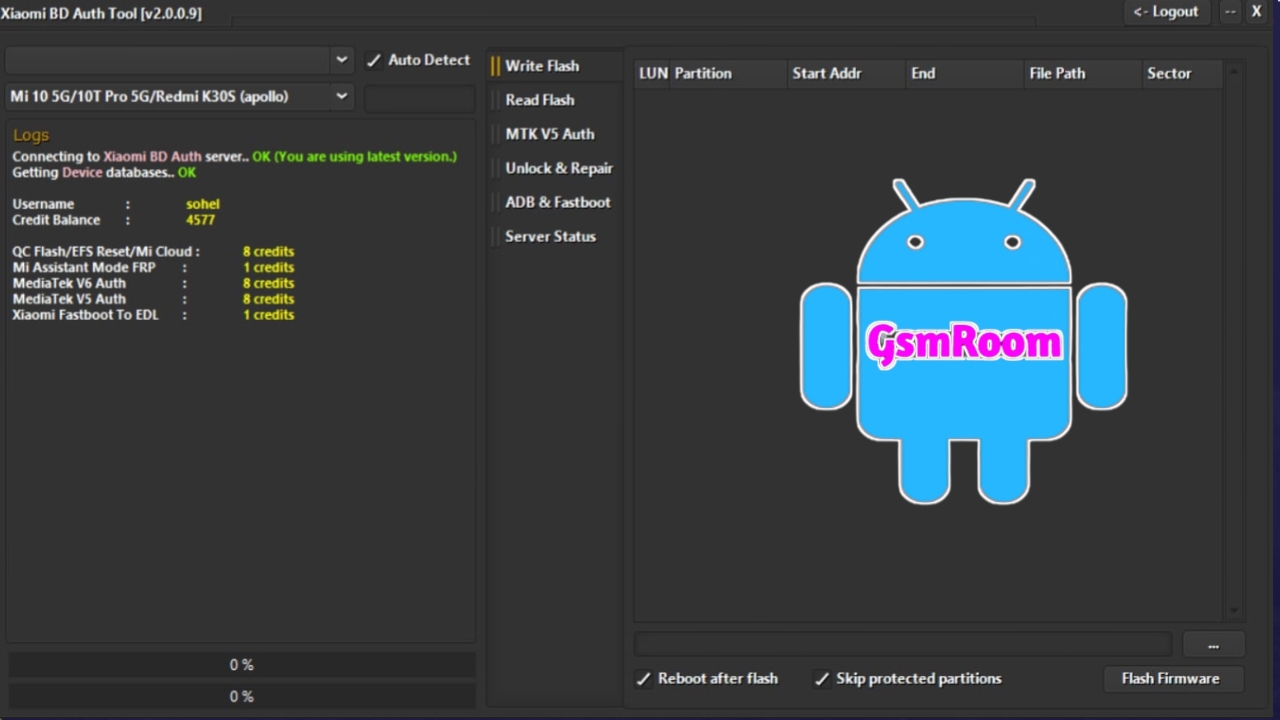
📌 What Is “Xiaomi BD Auth Tool V3.0”?
The term “Xiaomi BD Auth Tool V3.0” usually refers to a third-party authentication and service tool used by mobile technicians to perform operations on Xiaomi devices — especially on devices that require authentication (auth) for services like:
✅ FRP removal (Factory Reset Protection)
✅ EDL / BROM mode flashing with auth
✅ Mi account unlock / Mi Cloud removal
✅ Changing Fastboot/EDL states
✅ Qualcomm or MTK flashing with authentication
This type of auth tool is typically shared on GSM repair forums or third-party software sites, and it usually requires a login, credits, or server access to work fully.
📥 Features Commonly Found in Xiaomi Auth Tools
Tools in this category — including ones described as Auth V3.0 — are often used to:
🔓 Remove FRP and Mi Account Locks
They allow technicians to bypass FRP or Mi account login screens on devices that cannot otherwise be unlocked through normal methods.
📱 EDL / Fastboot to EDL Auth
Some modules can convert a device into Emergency Download Mode (EDL) even if the usual software tools don’t work, by performing the necessary authorization handshake.
💾 Flash Firmware or Repair System
With proper auth, these tools can flash stock firmware or repair corrupted partitions on Xiaomi devices powered by Qualcomm or MediaTek chipsets.
🔄 Convert Fastboot / Flash Operations
They may add the ability to switch between Fastboot and EDL in one step, or automatically perform authenticated flash tasks for supported models.
🧠 Login & Authorization Requirement
Unlike some general flash tools, auth tools often require a login — either:
🔹 A registered account on the tool’s server
🔹 Credit balances (pay per operation)
🔹 Server-based authorization tokens
This means the tool itself may not work offline, and you may need valid credentials to perform operations.
For example, on some shared implementations of “Xiaomi BD Auth Tool,” users must purchase credits before performing functions such as FRP removal or flash auth operations.
📥 Download and Login Notes
⚠️ No Official Xiaomi Auth Tool Named “BD Auth V3.0”
- There is no official Xiaomi-branded tool called “BD Auth V3.0”; this is a third-party technician tool circulated by independent developers or GSM software communities.
- Official Xiaomi authentication for flashing and Mi account work is generally done through Xiaomi’s official services or official Mi Unlock Tool for bootloader unlocking.
📁 Where Similar Tools Are Hosted
Authenticating and flashing tools for Xiaomi devices can be found on various sites that host mobile repair software:
✔ CN Auth Tool / Android Auth Tool – Auth and flash support with server features designed for Qualcomm and MTK devices.
✔ Xiaomi Power Tool – Includes components like MTK Auth, Qualcomm FRP tools, and more.
✔ Bimratool / Global Auth Tool – Professional auth solutions shared for a technician audience.
Often these tools offer login screens and require activation through an online server to function properly.
⚠️ Important Safety and Legal Notes
⚠️ Security and Malware Risk
Tools claiming to be “auth tools” are frequently shared by community sites — and they can contain malware or unsafe installers.
Always scan any downloaded package with reputable antivirus software before running it.
⚠️ Respect Legal Use
Unlocking, bypassing security protections, or altering devices without proper authorization or owner consent may be illegal in certain regions.
Always ensure you have permission from the device owner before performing these operations.
⚠️ Official vs. Third-Party Tools
If your goal is to officially unlock bootloader or flash firmware, prefer official Xiaomi tools whenever possible, such as:
🔹 Mi Unlock Tool (for bootloader) — official from Xiaomi.
🔹 MiFlash / CN Auth Tool (official authorized version) — provided through official channels.
🧠 Summary
“Xiaomi BD Auth V3.0 With Login” refers to a third-party Xiaomi authentication / repair tool that technicians use to perform advanced operations such as FRP removal, EDL mode auth, Mi account unlock, and flashing on Qualcomm/MTK Xiaomi devices. These tools typically require login or credit-based authentication and are not official Xiaomi software — so exercise caution and verify sources before downloading.