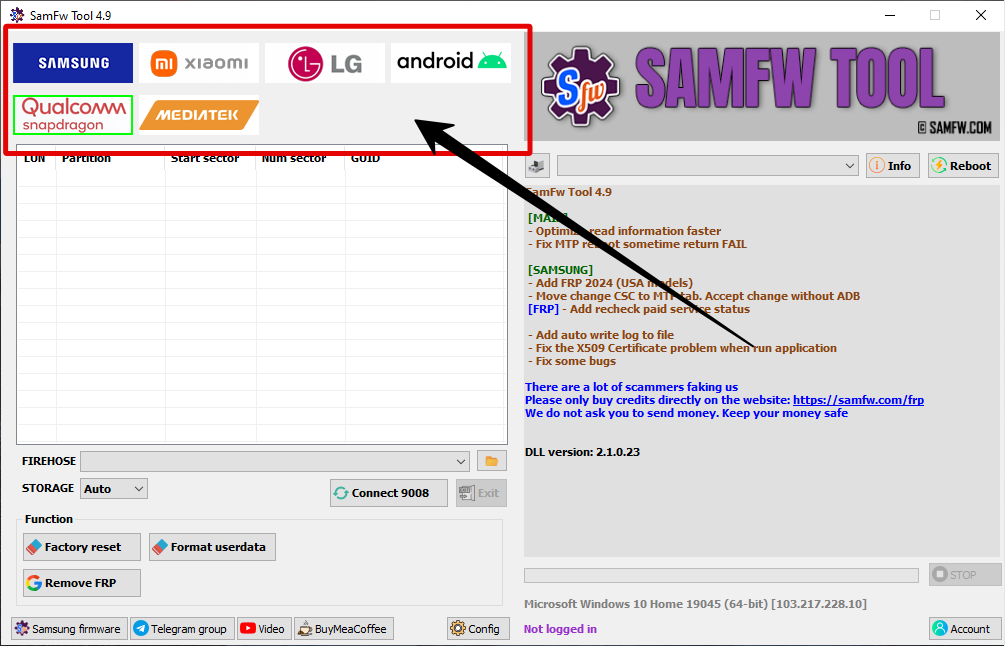
In the ever-evolving mobile repair industry, having a reliable and efficient software tool for Samsung devices is crucial. The SamFw Tool has become one of the most trusted and widely used utilities for Samsung FRP bypass, factory reset, firmware flashing, and ADB functions. This comprehensive guide provides everything you need to know about the SamFwTool Latest Version Free Download, including its features, download link, installation process, and usage guide — all updated for 2025.
Table of Contents
What Is SamFw Tool?
SamFw Tool is a multi-purpose Samsung utility software designed for technicians, service centers, and advanced Android users. It allows users to bypass FRP (Factory Reset Protection), reset devices, read device information, activate ADB mode, and perform advanced maintenance tasks on Samsung smartphones and tablets.
Developed by SamFw.com, the tool is known for its simple interface, high success rate, and compatibility with the latest Samsung firmware and Android versions. The best part? It’s completely free — no dongle, license, or activation is required.
Key Features of SamFw Tool Latest Version (2025 Update)
The latest version of SamFw Tool introduces new features and improved stability. Here’s a detailed look at what makes it one of the best Samsung repair tools available today:
1. FRP Bypass (Factory Reset Protection)
The FRP Bypass feature is one of the most popular functions of the SamFw Tool. With just a single click, you can remove Google account verification from Samsung devices. It supports Android 5.0 to Android 14 and works via USB cable in ADB or download mode.
2. Factory Reset and Wipe Data
Easily factory reset or wipe user data from any Samsung smartphone without needing to navigate through complicated menus. This feature is especially useful for phones that are stuck or locked.
3. Read and Write Device Information
SamFw Tool allows users to read IMEI, firmware version, CSC, model number, and security patch directly from the device. It’s a valuable feature for diagnosing and verifying device information before repairs.
4. ADB and Fastboot Functions
With its built-in ADB and Fastboot commands, the tool lets you perform advanced Android operations like enabling developer mode, unlocking OEM, and flashing recovery or boot images.
5. CSC and Firmware Management
SamFw Tool includes features for changing CSC (Country Specific Code) and flashing official Samsung firmware. This is useful for region switching and updating devices to specific firmware builds.
6. Bloatware Removal
The tool provides a bloatware remover option that helps users uninstall unnecessary system apps and services to improve performance and battery life.
7. Screen Lock and MDM Bypass
You can remove screen locks (PIN, pattern, password) and bypass MDM restrictions on supported Samsung models, making it a perfect tool for corporate device resets.
8. Multi-Brand Support (Partial)
While primarily built for Samsung, the latest update adds limited ADB support for Xiaomi, Huawei, and Oppo devices for FRP and reset tasks.
Supported Devices and Chipsets
- Galaxy S Series: S6, S7, S8, S9, S10, S20, S21, S22, S23
- Galaxy Note Series: Note 5 to Note 20 Ultra
- Galaxy A Series: A10, A20, A30, A50, A70, A90, A52, A72, A73, and newer models
- Galaxy M Series: M10, M20, M30, M40, M31, M51, and others
- Galaxy Tab Series: All major Samsung tablets
- Galaxy Fold & Z Series: Z Fold, Z Flip, and latest models
Supported Chipsets:
- Exynos
- Qualcomm Snapdragon
- MediaTek (Limited functions)
How to Download SamFw Tool Latest Version (2025)
Follow these steps to safely download the latest SamFwTool Latest Version Free Download for your Windows PC:
- Visit the official SamFw.com website or a trusted GSM forum.
- Locate the SamFw Tool latest version download section.
- Click on the “Download Now” button.
- Once downloaded, extract the ZIP file using WinRAR or 7-Zip.
- Run the setup file as Administrator to begin installation.
⚠️ Note: Always download from official or verified sources to avoid malware or fake versions of the tool.
File Information:
- Name: SamFwTool_Setup_v4.9.0.zip
- Version: v4.9.0 (2025 Update)
- Size: ~150 MB
- License: Freeware (No Activation Required)
How to Install SamFw Tool on Windows
- Extract the downloaded ZIP file.
- Open the installer file (SamFwTool_Setup.exe).
- Follow the on-screen instructions to complete the setup.
- After installation, launch the tool from the desktop shortcut.
- Wait for the tool to detect your device automatically.
How to Use SamFw Tool for FRP Bypass (Step-by-Step Guide)
- Open SamFw Tool on your PC.
- Connect your Samsung phone in normal mode using a USB cable.
- Click on the FRP Bypass tab in the tool.
- Press “Remove FRP (ADB)” or “Remove FRP (Download Mode)” depending on your phone’s condition.
- Wait a few seconds — the tool will remove the FRP lock automatically.
- Once done, the device will reboot and you can set it up normally.
This simple method works on most Samsung devices running Android 5 to 14 and is considered one of the fastest FRP bypass solutions available in 2025.
Why Choose SamFw Tool Over Others?
There are many FRP and Samsung tools on the market, but SamFwTool Latest Version Free Download remains the most trusted due to its:
- Free access with no activation key required
- High success rate across Android versions
- Fast one-click operations
- Regular updates and new features
- User-friendly interface suitable for beginners and professionals
It’s the perfect combination of simplicity and power, making it the go-to tool for mobile technicians worldwide.







