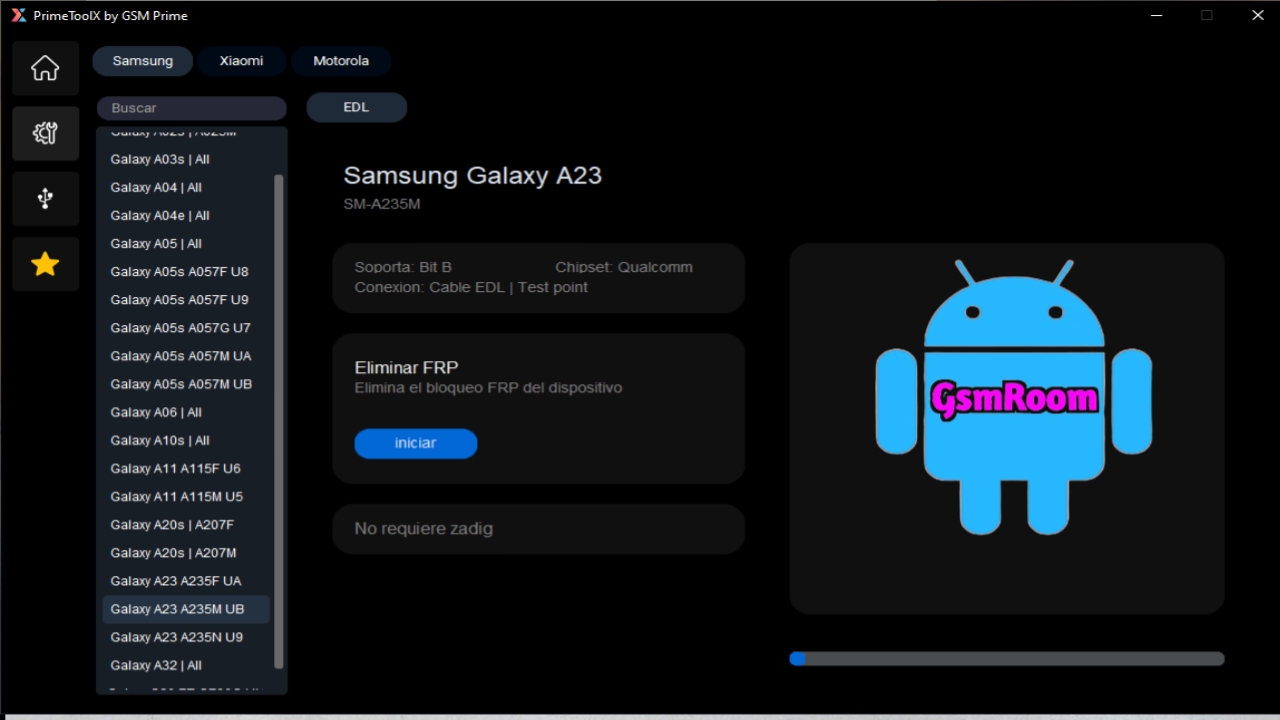
Prime Tool X V8.2.5 is the newest and most advanced version of the popular all-in-one mobile servicing tool trusted by GSM technicians worldwide. Designed to simplify complex smartphone software operations, the latest update brings enhanced performance, expanded model support, and faster algorithms to handle FRP removal, flashing, unlocking, and repair operations. Whether you manage a repair center or perform technical tasks at a professional level, Prime Tool X V8.2.5 offers everything needed for modern device servicing—fully free of cost.
This in-depth guide provides a complete overview of the tool, including its features, supported functions, system requirements, installation steps, and how to download it safely.
What Is Prime Tool X V8.2.5?
Prime Tool X V8.2.5 is a comprehensive smartphone repair utility built for multi-brand servicing. It combines multiple modules—MTK, Qualcomm, SPD, Samsung, Fastboot, and ADB—into a single platform, allowing technicians to perform dozens of operations with ease.
The latest version offers improved stability, updated FRP techniques, and optimized flashing engines for smooth, error-free device handling.
Key Features of Prime Tool X V8.2.5
Prime Tool X V8.2.5 packs several enhanced functionalities designed for professional-grade mobile repair:
1. Updated FRP Removal System
The tool includes fast and effective FRP bypass methods for:
- Samsung
- Xiaomi
- Oppo & Vivo
- Realme
- Tecno
- Infinix
- Nokia
Its 2026 FRP algorithm update ensures high success rates even on the latest security patches.
2. Multi-Chipset Support
Prime Tool X V8.2.5 supports all major chipset platforms:
- MTK (MediaTek)
- Qualcomm Snapdragon
- Unisoc/Spreadtrum (SPD)
- Exynos (limited)
This broad coverage makes it suitable for nearly all mid-range and budget smartphone models.
3. Flashing & Unlocking Capabilities
With improved flashing engines, the tool can perform:
- Stock firmware flashing
- Bootloader unlocking
- Network unlock (where legally permitted)
- FRP & Factory Reset
- Full device repair
These features make it a powerful alternative to many paid tools.
4. ADB and Fastboot Toolkit
Prime Tool X includes a fully functional ADB/Fastboot module, offering:
- ADB FRP reset
- Factory reset commands
- Reboot (EDL/Bootloader/Recovery)
- Full device info extraction
5. Samsung Special Functions
The dedicated Samsung module lets you:
- Remove Samsung FRP
- Execute MTP/ADB tasks
- Manage Download Mode
- Use Device Info & Reset Tools
Useful for handling modern Samsung models with tight security.
6. Clean & Fast User Interface
Designed with technicians in mind, the tool features a simple dashboard that improves workflow efficiency and reduces operation time.
What’s New in Prime Tool X V8.2.5
The latest version introduces several major improvements:
- Enhanced MTK bypass system
- Faster Qualcomm EDL operations
- Updated FRP packages for 2025–2026 devices
- Improved Samsung MTP FRP support
- Better device detection stability
- Enhanced support for Windows 11
- Crash-free execution with optimized memory handling
These upgrades make it the most stable release yet.
System Requirements
To ensure smooth use of Prime Tool X V8.2.5, your computer should meet the following:
Minimum Requirements
- Windows 7/8/10/11
- Intel/AMD multi-core CPU
- 2GB RAM
- 500MB free disk space
- Installed USB drivers
Recommended Requirements
- Windows 10/11 64-bit
- 4GB–8GB RAM
- Updated MTK/Qualcomm/SPD drivers
- Internet connection for online features
How to Download Prime Tool X V8.2.5 (Safe Guide)
To download the latest version safely:
- Choose a trusted website offering the official tool package.
- Download the ZIP or RAR file.
- Extract using WinRAR or 7-Zip.
- Open PrimeToolX.exe as Administrator.
- Install necessary phone drivers if required.
Always avoid unverified sources to prevent corrupt or harmful files.
How to Install Prime Tool X V8.2.5
Step 1 – Extract Files
Unzip the downloaded archive onto your desktop.
Step 2 – Install Drivers
Install MTK, Qualcomm, SPD, and ADB drivers depending on the devices you repair.
Step 3 – Run the Tool
Launch the tool with administrative privileges.
Step 4 – Connect Device
Use a quality USB cable and switch the phone to the required mode:
- MTP
- Fastboot
- EDL
- BROM
- Recovery
Step 5 – Perform the Operation
Select the desired task (FRP, Flash, Unlock, Reset, etc.) and let the tool process automatically.
Prime Tool X V8.2.5 Main Modules
1. MTK Module
- BROM & Preloader mode support
- FRP reset
- Bootloader lock/unlock
- Partition read/write
2. Qualcomm Module
- EDL operations
- Flashing firmware
- Factory reset
- Partition repair
3. SPD Module
- PAC firmware flashing
- FRP removal
- Reset functions
4. Samsung Module
- Samsung FRP 2026 method
- ADB/MTP operations
- Device info tools
5. ADB/Fastboot Module
- ADB activation functions
- Reboot commands
- Device control utilities
Why Choose Prime Tool X V8.2.5?
✔ Free to Use
No activation costs or subscription fees.
✔ Professional-Level Functions
Suitable for repair shops and mobile service centers.
✔ Multi-Brand Support
Works with a large number of smartphones.
✔ Updated for 2026 Models
Supports the latest security patches and device releases.
✔ Stable & Fast
Optimized for reliable, error-free operation.
FAQs – Prime Tool X V8.2.5
1. Is Prime Tool X V8.2.5 free?
Yes, it is completely free to download and use.
2. Does it remove Samsung FRP?
Yes, it includes the latest Samsung FRP techniques.
3. Can I flash MTK and Qualcomm phones?
Yes, the tool supports both platforms.
4. Is login required?
Most modules work without login.
5. Does it support Windows 11?
Yes, the tool works perfectly on Windows 10 and 11.







