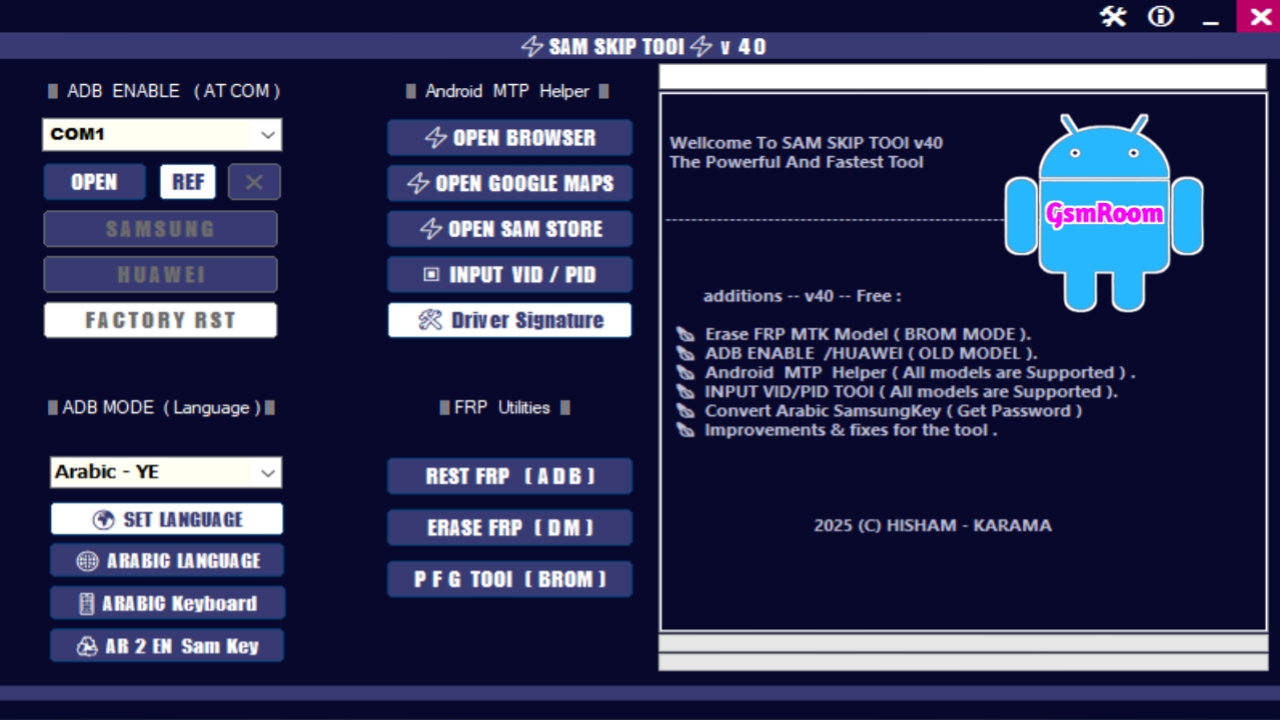
The SAM SKIP TOOL v40 and Partition Format Guru Tool v4.0 are two advanced and highly reliable utilities designed for professional Android servicing and repair. In 2026, these tools remain among the most trusted solutions for Samsung FRP bypass, security lock removal, and deep partition formatting. Together, they provide a complete toolkit for technicians, mobile repair shops, and advanced Android users who demand efficiency, accuracy, and compatibility with modern devices.
This detailed guide explains everything you need to know about SAM SKIP TOOL v40 and Partition Format Guru Tool v4.0, including features, updates, supported devices, system requirements, usage methods, and key advantages.
What Is SAM SKIP TOOL v40?
SAM SKIP TOOL v40 is a specialized Samsung FRP bypass and security utility. It is designed to remove Google account locks (FRP) and handle Samsung security protections after a factory reset. The tool works through ADB and Download Mode, ensuring high success rates on supported Samsung models.
The v40 release is optimized for newer Android versions and updated Samsung security patches, making it suitable for devices released in 2025–2026.
Key Features of SAM SKIP TOOL v40
Samsung FRP Bypass
- Remove Google account verification after reset
- Supports multiple Android versions
- Compatible with newer Samsung security updates
No Login or Activation
- Completely free to use
- No username, password, or dongle required
- Offline operation supported
ADB & Download Mode Support
- FRP removal via ADB for accessible devices
- Download Mode support for locked phones
- Fast and stable device detection
Lightweight & Efficient
- Small file size
- Runs smoothly on low-end PCs
- One-click operations for faster results
What’s New in SAM SKIP TOOL v40 (2026 Edition)?
- Improved FRP bypass methods
- Enhanced compatibility with new Samsung Galaxy models
- Better performance on Windows 10 and Windows 11
- Faster execution and reduced failure rate
- Bug fixes and stability improvements
What Is Partition Format Guru Tool v4.0?
Partition Format Guru Tool v4.0 is a professional Android utility designed to format, repair, and rebuild corrupted partitions. It is widely used to fix bootloop issues, storage corruption, and software crashes caused by damaged partitions.
This tool is especially useful after failed flashing, malware damage, or severe system corruption.
Key Features of Partition Format Guru Tool v4.0
Advanced Partition Formatting
- Format userdata, cache, system, and custom partitions
- Safe and controlled formatting process
Fix Bootloop & Storage Errors
- Repair corrupted partition tables
- Resolve boot issues caused by damaged storage
MTK & Qualcomm Support
- Works on MediaTek and Qualcomm chipsets
- Compatible with a wide range of Android brands
Professional-Level Repair Utility
- Ideal for technicians and service centers
- High success rate when used correctly
What’s New in Partition Format Guru Tool v4.0?
- Updated partition handling engine
- Improved support for modern Android versions
- Faster formatting and repair operations
- Better error handling and system stability
Supported Devices
SAM SKIP TOOL v40
- Samsung Galaxy A Series
- Samsung Galaxy M Series
- Samsung Galaxy S Series
- Samsung Galaxy Note Series
- Samsung Galaxy Tab Series
- Exynos and Snapdragon-powered devices
Partition Format Guru Tool v4.0
- Samsung, Xiaomi, Oppo, Vivo, Realme
- Tecno, Infinix, Nokia, Motorola
- MTK and Qualcomm-based Android devices
System Requirements (Both Tools)
To use SAM SKIP TOOL v40 and Partition Format Guru Tool v4.0, your PC should meet these requirements:
- Operating System: Windows
- RAM: Minimum 4 GB (8 GB recommended)
- Processor: Intel or AMD Dual Core or higher
- Storage: At least 500 MB free disk space
- Drivers: Samsung USB, MTK, and Qualcomm drivers installed
How to Install SAM SKIP TOOL v40
- Download the tool from a trusted source
- Extract the ZIP file using WinRAR or 7-Zip
- Install Samsung USB drivers
- Disable antivirus temporarily (if required)
- Run the tool as Administrator
How to Install Partition Format Guru Tool v4.0
- Download Partition Format Guru Tool v4.0
- Extract the files to your PC
- Install MTK and Qualcomm USB drivers
- Launch the tool as Administrator
- Select the required partition operation
Why Use Both Tools Together?
Using SAM SKIP TOOL v40 and Partition Format Guru Tool v4.0 together provides a complete Android servicing solution:
- Remove Samsung FRP locks quickly
- Repair corrupted partitions after flashing
- Fix bootloop and software crashes
- Handle advanced Android repair tasks efficiently
This combination is ideal for professional technicians and advanced users working on complex Android issues.
Common Issues & Solutions
Device not detected
- Reinstall correct USB drivers
- Change USB cable or port
Operation failed
- Ensure correct device mode (ADB or Download)
- Restart the device and retry
Tool not opening
- Run as Administrator
- Temporarily disable antivirus
Is It Safe to Use These Tools?
Yes. When downloaded from reliable sources and used correctly, SAM SKIP TOOL v40 and Partition Format Guru Tool v4.0 are safe. Antivirus alerts may appear due to deep system-level operations, which is normal for professional Android servicing tools.
Password- SAM123







