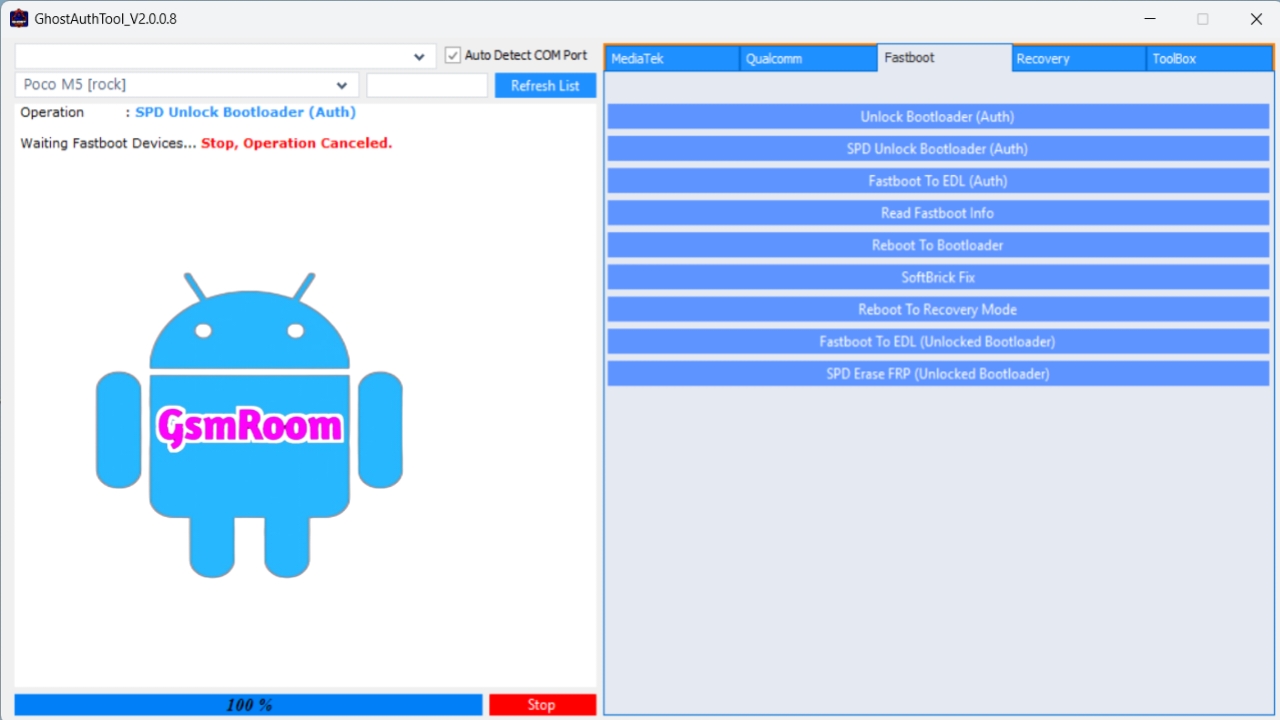
Ghost Auth Tool V2.0.0.8 is a Windows-based mobile service utility commonly used by technicians for authentication-based repair processes on Android smartphones and feature phones, especially devices that require secure authentication for deep operations — such as firmware flashing, FRP unlocks, account resets, and bypasses.
This version (v2.0.0.8) circulating in 2026 is widely shared as a free download by community forums and mobile repair sites — and many builds include preconfigured login access so you don’t need paid subscription or extra tokens to start working.
📌 What Is Ghost Auth Tool?
The Ghost Auth Tool is an authentication and servicing tool that enables technicians to perform low-level interactions with supported devices. Unlike simple flash or unlock utilities, this tool provides authenticated access, meaning it can interact with protected components that ordinary methods cannot reach.
It’s often used for:
✔ Authenticated EDL/Flash operations
✔ FRP unlock and Google account bypass
✔ Samsung/Qualcomm signed operations
✔ Account lock/remove securely
✔ Partition flash requiring signed firehose
✔ Deep system repair on locked devices
Authentication tools like Ghost Auth Tool make deep repair flows possible on many Android devices that otherwise refuse to enter service modes.
⭐ Key Features of Ghost Auth Tool V2.0.0.8 (2026)
✔ Free Login Included — no paid subscription or credit required
✔ Qualcomm Authentication Support — works with signed Firehose for supported Qualcomm devices
✔ FRP & Security Unlock — bypass tools for factory reset protection
✔ Account/Lock Removal — remove signed account blocks on some models
✔ Firmware Flashing Assistance — allows deep firmware operations requiring auth
✔ Multi-Brand Compatiblity — Samsung, Xiaomi, Oppo, Realme, and more (model-dependent)
✔ User-Friendly UI — accessible menu with guided steps
⚠️ The tool’s exact feature list depends on the specific build and modules included with the 2.0.0.8 release and may vary by website publishing the download.
📱 Supported Platforms & Chipsets
Ghost Auth Tool generally supports:
✔ Qualcomm (Snapdragon) — EDL/9008 modes with signed access
✔ Samsung specific authentication paths
✔ Some MediaTek models (auth bypass where available)
✔ Other Android brands with auth needs
The tool’s authentication capabilities may require correct mode, drivers, and signed files depending on the device model and security requirements.
💻 System Requirements
To use Ghost Auth Tool V2.0.0.8 on your PC:
✔ Windows
✔ Latest USB Drivers installed (Qualcomm, Samsung, MediaTek)
✔ ADB & Fastboot drivers if needed
✔ Stable USB data cable connection
✔ Administrator privileges (Run as Admin)
📍 Typical Use Cases
🔓 FRP & Google Account Bypass
Bypasses Factory Reset Protection on supported Android devices that need authenticated interaction.
🔐 Account Lock Removal
Removes signed account locks (e.g., Samsung / Mi Cloud / OEM blocks) when possible.
🔄 Authenticated Flash/EDL
Allows firmware flashing that requires signed access via tools like QFIL or authenticated loader modules.
🛠 Deep Repair Options
Handles partition repair, secure reset, and other tasks not accessible via general tools.
📥 How to Download & Install (General Steps)
- Find a Trusted Download Source
Look for a reputable mobile repair tool repository or community forum hosting the Ghost Auth Tool V2.0.0.8 package. - Download the Tool Package
The file usually comes as a ZIP/RAR archive. - Extract the Files
Use WinRAR or 7-Zip to extract contents to a folder. - Disable Antivirus Temporarily (Optional)
Some security programs may flag repair tools as false positives. - Run as Administrator
Right-click the main executable and select Run as administrator. - Login/Access
Use the preconfigured free login included with the tool — typically provided as a text file or embedded in the UI. - Connect Your Device
Follow the tool’s prompts to detect your device before executing the desired operation. - Select Operation
Choose FRP bypass, authenticated flash, account removal, or other features.
⚠️ Important Safety & Legal Considerations
🔒 Authorized Use Only
You must only use this tool on devices you own or are legally authorized to service. Unauthorized bypassing of security protections can be illegal.
🛡 Always Scan Downloaded Files
Third-party tools can carry risks. Always scan executables with a reliable antivirus before running them.
📜 Understand the Operation
Authenticated tools can perform deep system changes — incorrect use can brick a device permanently.
🔍 Device & Security Limitations
Not every device or model will support authentication bypass. Latest Android versions and newer security patches may block or limit tool effectiveness.
📝 Pros & Cons
✅ Pros
✔ Free login included (no subscription)
✔ Supports authenticated operations
✔ Multi-brand availability
✔ Works offline once downloaded
✔ Broad feature list for deep repairs
❌ Cons
✘ Not an official OEM tool
✘ Some functions may not work on all devices
✘ Malware risk if downloaded from unsafe sources
✘ May be blocked by latest security patches
📌 Summary – Ghost Auth Tool V2.0.0.8 (Free Download 2026)
Ghost Auth Tool V2.0.0.8 is a free authentication-based mobile repair tool enabling FRP bypass, account removal, secure firmware interaction, and authenticated operations on supported Android devices — particularly those with Qualcomm chipsets and Samsung models.
- Free download with free login access
- No paid subscriptions or dongles
- Supports deep repair and secure unlock tasks
- Widely used by technicians in 2026
⚠️ Always use responsibly, ethically, and on authorized devices only.
If you want safe download links, installation steps, or a step-by-step guide for a specific function (like FRP bypass or authenticated flashing), just tell me the device model and I can tailor the instructions!







