Introduction to PrimeToolX Version 8.8
In the world of mobile device servicing, PrimeToolX Version 8.8 stands out as a powerful, all-in-one software solution designed for Android technicians, repair professionals, and advanced users. Whether you’re dealing with firmware flashing, FRP issues, diagnostic tasks, unbricking devices, or configuration management, PrimeToolX 8.8 offers a broad suite of tools built for speed, stability, and reliability.
This in-depth guide covers everything you need to know about PrimeToolX 8.8 — including features, supported models, how it works, installation, usage, safety tips, and free download details — written specifically in English for maximum clarity and comprehension.
What Is PrimeToolX Version 8.8?
PrimeToolX Version 8.8 is a professional-grade software toolkit developed for handling complex software issues on Android devices. Built with versatility in mind, PrimeToolX allows authorized technicians to perform tasks such as:
- Firmware flashing
- Factory Reset Protection (FRP) assistance
- Read/Write device information
- Boot repair
- IMEI and network module support (where legal and permitted)
- Device unlocking
- Diagnostic scanning
Key Features of PrimeToolX Version 8.8
PrimeToolX 8.8 introduces a range of powerful capabilities that enhance both performance and usability.
1. Extensive Brand and Model Support
PrimeToolX 8.8 supports a wide variety of Android manufacturers, including:
- Samsung
- Xiaomi
- Oppo
- Vivo
- Realme
- OnePlus
- Huawei
- Motorola
- More mainstream and regional Android devices
2. User-Friendly Interface
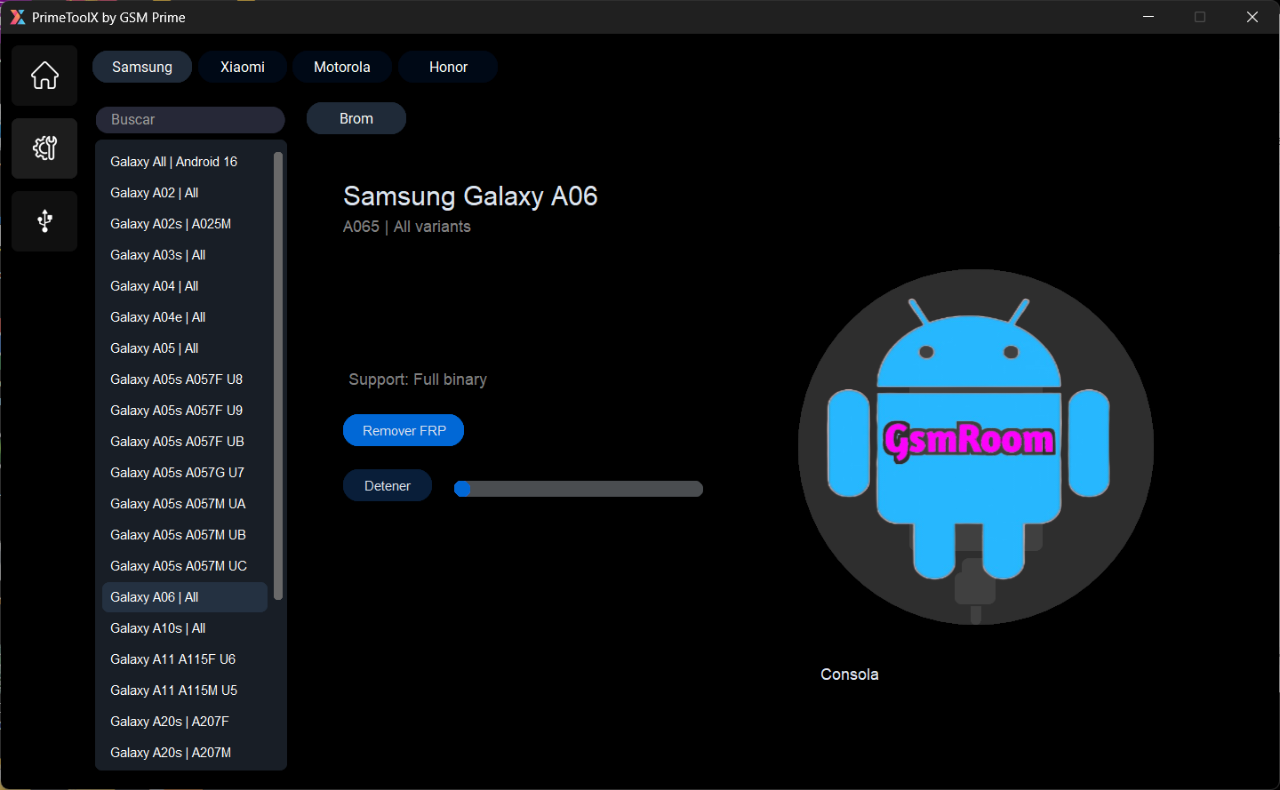
The interface in PrimeToolX 8.8 is carefully designed to make navigation smooth — from beginners to advanced users — with clear labels and guided options for each task.
3. Advanced Flashing Functions
PrimeToolX supports multiple flashing modes, such as:
- Download mode
- Fastboot mode
- EDL / Download Agent mode
- Scatter / Custom firmware
These capabilities make it effective for firmware upgrades, downgrades, and full system reinstalls.
4. Enhanced Diagnostic Tools
With built-in diagnostic functions, PrimeToolX offers:
- Device info reading
- Security patch status
- Bootloader state
- Hardware identification
This data helps technicians identify issues quickly and accurately.
5. FRP & Lock Solutions
PrimeToolX provides tools and workflows — where permitted — for assisting with Factory Reset Protection (FRP) issues, helping users regain access to a device after reset scenarios.
6. Multi-Mode Operation
PrimeToolX works across:
- ADB mode
- Fastboot mode
- EDL / Download mode
- Recovery mode
This multi-mode flexibility ensures technicians can resolve software problems in most common locked or broken states.
7. Regular Updates
Version 8.8 includes performance improvements, extended device compatibility, and bug fixes from earlier releases.
System Requirements
Before downloading and installing PrimeToolX Version 8.8, ensure your system meets the following minimum requirements:
PC Requirements
✔ Operating System: Windows 7 / 8 / 10 / 11 (64-bit recommended)
✔ Processor: Dual-core Intel or AMD
✔ RAM: 4 GB minimum (8 GB recommended)
✔ Free Disk Space: At least 5 GB
✔ Drivers: Latest Android USB drivers installed
✔ Internet Access: Recommended for updates
Having the correct drivers ensures that devices are properly detected and communicated with during operations.
How PrimeToolX 8.8 Works (General Workflow)
PrimeToolX follows a simple yet powerful workflow designed to help technicians manage devices quickly.
Step 1 – Connect Device
Use a reliable USB cable to connect the target device to your PC.
Step 2 – Choose Operation Mode
Select one of the supported modes:
- Fastboot
- ADB
- EDL
- Download
Common Tasks You Can Perform With PrimeToolX
Here are some practical ways technicians use PrimeToolX 8.8 on Android devices:
✔ Firmware Flashing
Reinstall or replace the device firmware to fix software corruption or boot failure.
✔ Read Device Information
Display model, firmware version, security patch level, bootloader status, and more.
✔ FRP Assistance
Help users handle Factory Reset Protection screens on authorized devices.
✔ Boot Repair and Unbrick
Recover devices stuck in boot loops or non-responsive states.
✔ Unlock Patterns or PINs
Assist with unlocking screen locks if you have legal authorization and proof of ownership.
Safety Tips and Best Practices
Using powerful tools like PrimeToolX requires responsibility and caution:
1. Use Only on Authorized Devices
Never use the software on devices you do not own or don’t have permission to service.
2. Keep Original Firmware Backups
Before flashing or modifying software, back up existing device data.
3. Download Only Official Releases
Avoid cracked or pirated copies — these are often unsafe and illegal.
4. Comply With Local Laws
Ensure that your repair and unlocking activities follow regional legal guidelines.
5. Use Appropriate USB Cables
High-quality cables reduce the risk of disconnection during sensitive tasks.
Troubleshooting Common Issues
Here are fixes for common problems:
Issue: Device Not Detecting
✔ Update USB drivers
✔ Try another USB cable
✔ Enable USB Debugging if in ADB mode
Issue: Flash Process Failed
✔ Confirm correct firmware file
✔ Switch to correct mode (Fastboot / EDL)
✔ Reconnect device
Issue: Tool Crashes or Freezes
✔ Reinstall PrimeToolX
✔ Check Windows updates
✔ Restart PC