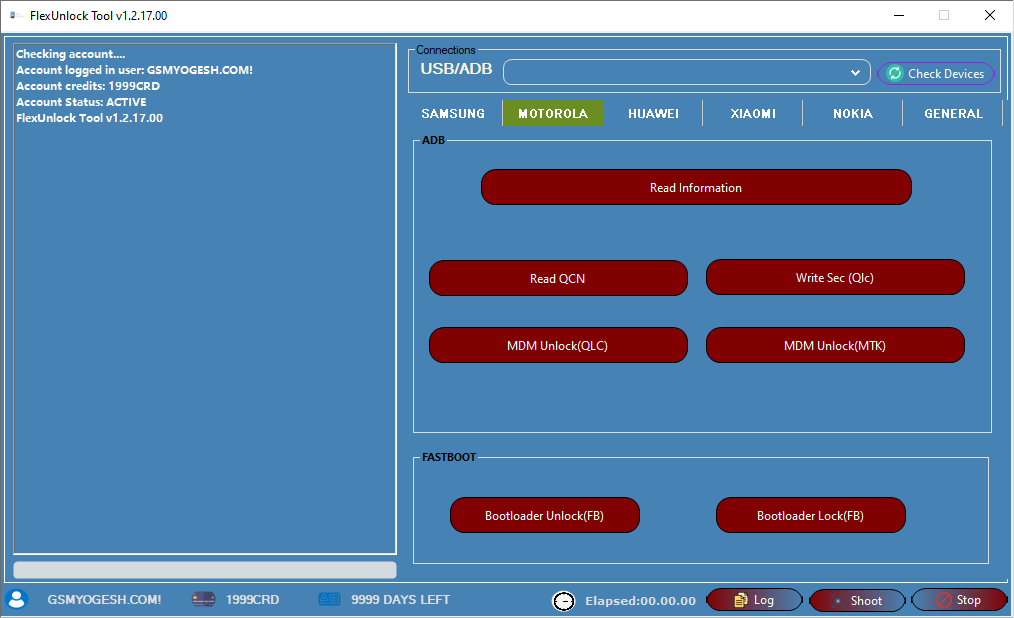
FlexUnlock Tool v1.2.17.00 is a powerful all-in-one Android servicing software used for FRP bypass, MDM unlock, bootloader operations, and firmware flashing. It is widely trusted by mobile technicians because of its multi-brand support and advanced unlocking capabilities.
FlexUnlock Tool Used For?
- Remove FRP lock
- Handle MDM and IT Admin restrictions
- Unlock or lock bootloader
- Read device information
- Work with firmware files
- Fix common Android problems
Main Features of FlexUnlock Tool
🔹 Samsung Support
- FRP removal using ADB and MTP
- KG lock bypass (latest security supported)
- IT Admin bypass
- CSC change option
- Odin flashing support
- Read and write PIT files
- Boot and EFS functions
- QR code unlock option
🔹 Xiaomi Support
- Device information reading
- Bootloader unlock
- BL to EDL conversion
- MI account removal
- Critical data creation
- Server-based tools
🔹 Motorola Support
- Device info reading
- QCN operations
- MDM unlock
- Bootloader lock / unlock
🔹 Huawei Support
- FRP removal
- Bootloader operations
- Recovery and dload support
🔹 Nokia Support
- MDM removal
- IT Admin bypass
- Bootloader functions
✅ Samsung MDM & KG Bypass
- Works with Knox 3.0 to 3.5
- Supports Android 10 to Android 15
- Compatible with One UI 3 to One UI 6
- Supports Galaxy S, Note, and A series
- No credits required
- Smooth and stable performance
✅ Pixel FRP Improvement
- Supports Pixel 4 to Pixel 8
- Added support for Pixel Fold and Pixel Tablet
- Android 11 to 15 fully supported
- Older Android versions partially supported
- Higher success rate than before
✅ Performance Improvements
- Faster phone detection
- Better stability on Windows 10
- Reduced crashes
- Smooth tool loading
- Improved background processes
🔓 FRP Bypass (Google Lock)
- Remove Factory Reset Protection (FRP)
- Works via ADB, MTP, and Fastboot modes
- Supports many Android versions
🔐 MDM / KG / IT Admin Bypass
- Remove MDM (Mobile Device Management) lock
- Bypass Samsung KG (Knox Guard)
- Remove IT Admin restrictions
📱 Bootloader & Unlocking
- Unlock / relock bootloader
- Switch device modes (ADB, Fastboot, EDL)
- Advanced device control options
📥 Flashing & Repair
- Flash firmware (Samsung, Xiaomi, etc.)
- Fix bootloop and soft-brick issues
- Restore system partitions
📊 Device Information & Tools
- Read complete device info
- Backup and manage partitions
- BIN / IMG file editing support
📱 Supported Devices
FlexUnlock Tool supports a wide range of brands:
- Samsung
- Xiaomi
- Redmi
- Poco
- Motorola
- Huawei
- Nokia
- Google Pixel
It also supports:
- MediaTek (MTK)
- Qualcomm
- Other Android platforms
⚙️ How to Use (Basic Steps)
- Install USB drivers (ADB, MTK, Qualcomm)
- Open the tool as Administrator
- Connect your device via USB
- Select function (FRP, MDM, Flash, Unlock)
Password:- softwarecrackguru







