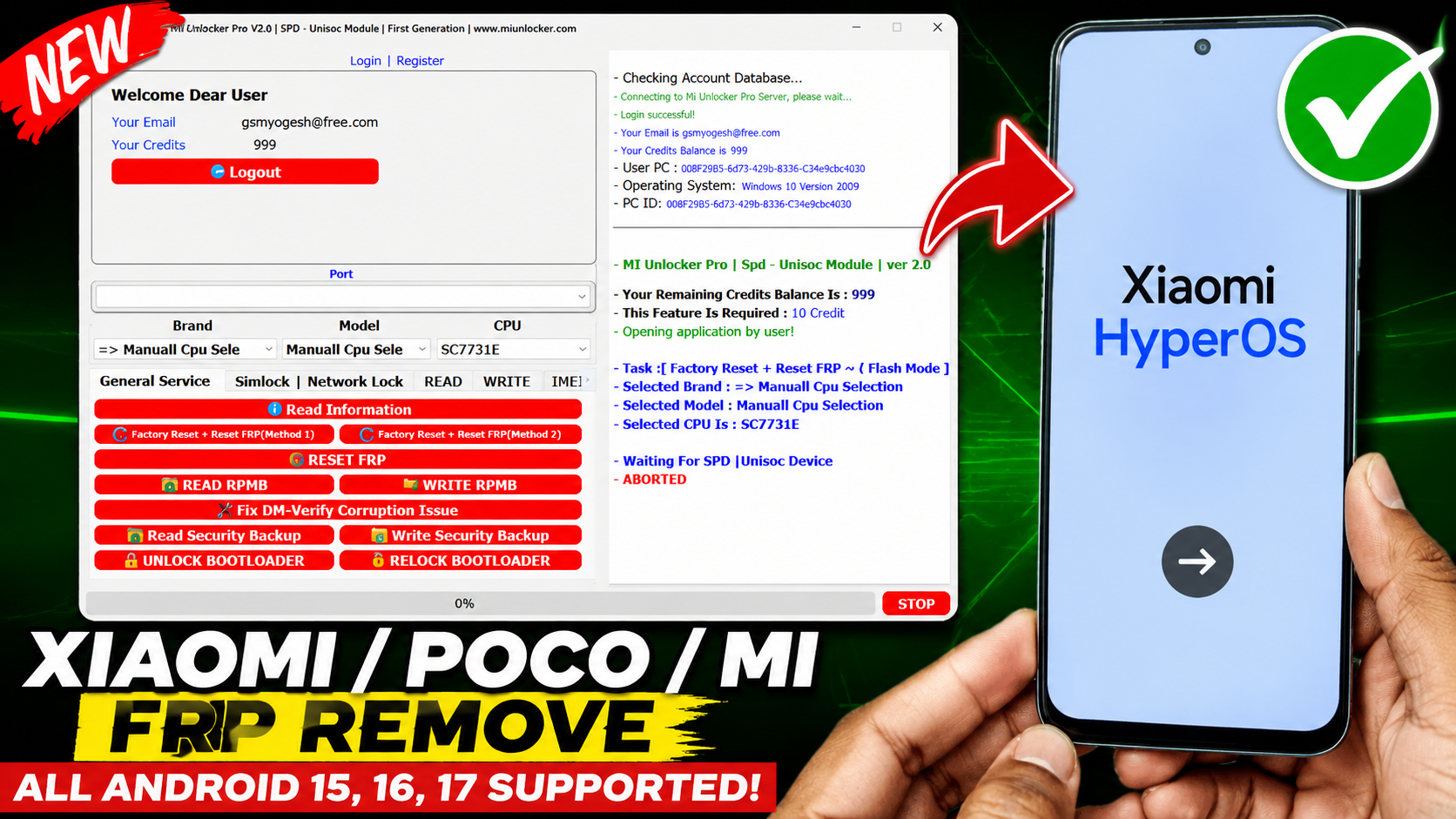
MH Unlocker Pro SPD Module V2.0 is a powerful Android servicing utility developed specifically for devices powered by Spreadtrum (SPD/UNISOC) chipsets. The tool provides a collection of advanced functions that help mobile technicians perform device maintenance, unlock operations, FRP management, factory reset procedures, and other software repair tasks quickly and efficiently.
The latest version introduces improved compatibility with modern SPD devices, enhanced stability, and a streamlined user interface that makes servicing easier for both beginners and professional technicians. With support for numerous SPD-powered smartphones and tablets, MH Unlocker Pro SPD Module V2.0 has become a popular choice among mobile repair professionals worldwide.
What is MH Unlocker Pro SPD Module V2.0?
MH Unlocker Pro SPD Module V2.0 is a Windows-based servicing tool designed to communicate with SPD and UNISOC-powered Android devices. The software integrates multiple maintenance and diagnostic features into a single platform, allowing users to perform common repair operations without complicated procedures.
The tool is particularly useful for technicians working with budget and mid-range Android smartphones that utilize Spreadtrum processors.
Key supported functions include:
- Device Identification
- Factory Reset
- FRP Management
- Boot Mode Functions
- Device Information Reading
- User Data Operations
- Diagnostic Utilities
- Android Servicing Functions
Main Features of MH Unlocker Pro SPD Module V2.0
1. SPD Device Detection
Information displayed includes:
- Device Model
- Android Version
- Build Number
- Product Name
- Security Patch Level
- CPU Information
- Device Status
2. Factory Reset Functions
One of the most frequently used features is the factory reset option.
Benefits include:
- Fast Device Reset
- User Data Cleaning
- Software Troubleshooting
- Device Recovery Assistance
3. FRP Management
Factory Reset Protection is a security feature included in Android devices. MH Unlocker Pro SPD Module V2.0 includes several servicing functions that assist technicians in managing FRP-related repair procedures on supported devices.
Advantages include:
- Simplified Workflow
- SPD Device Support
- Improved Success Rate
- Faster Processing Time
4. Read Device Information
The Read Info function allows technicians to gather detailed information from connected devices.
Information may include:
- Device Brand
- Model Number
- Android Version
- Product Details
- Hardware Information
5. User-Friendly Interface
The tool has been designed with simplicity in mind.
Benefits include:
- Easy Navigation
- Clean Dashboard
- Organized Functions
- Quick Access Buttons
- Minimal Learning Curve
6. Broad SPD Compatibility
MH Unlocker Pro SPD Module V2.0 supports a large range of SPD and UNISOC chipsets found in many Android devices.
Supported brands may include:
- Itel
- Tecno
- Infinix
- Nokia
- Lava
- Micromax
- Symphony
- Walton
- Realme
- Motorola
- Various Generic SPD Devices
New Features in Version 2.0
The latest version includes several improvements over previous releases.
Enhanced Device Support
Support for additional SPD and UNISOC devices.
Improved Stability
Reduced crashes and improved operation reliability.
Faster Processing
Optimized functions for quicker execution.
Updated Interface
A cleaner layout improves productivity and ease of use.
Bug Fixes
Several issues reported in previous versions have been addressed.
System Requirements
Before installing MH Unlocker Pro SPD Module V2.0, ensure your system meets the following requirements.
Minimum Requirements
- Windows 7 (32-bit or 64-bit)
- 2 GB RAM
- Intel Dual-Core Processor
- 500 MB Free Storage
- USB Port
Recommended Requirements
- Windows 10 or Windows 11
- 4 GB RAM or Higher
- Intel Core i3/i5/i7 Processor
- Latest USB Drivers Installed
- Stable Internet Connection
How to Install MH Unlocker Pro SPD Module V2.0
Follow these steps for installation:
Step 1
Download the latest setup package.
Step 2
Extract the ZIP archive using WinRAR or 7-Zip.
Step 3
Open the extracted folder.
Step 4
Run the executable file as Administrator.
Step 5
Install required SPD USB drivers if necessary.
Step 6
Launch the tool and connect the device.
Step 7
Select the desired operation from the main dashboard.
Advantages of MH Unlocker Pro SPD Module V2.0
Fast Performance
Operations are executed quickly, reducing service time.
Simple User Interface
Functions are clearly organized and easy to access.
Wide Device Coverage
Supports numerous SPD-powered smartphones.
Professional Utility
Suitable for mobile repair shops and service centers.
Regular Updates
Improved compatibility with newer devices and firmware versions.
Common Uses for Mobile Technicians
Mobile repair professionals use MH Unlocker Pro SPD Module V2.0 for:
- Android Maintenance
- Device Diagnostics
- Software Troubleshooting
- Device Information Reading
- Factory Reset Procedures
- SPD Device Servicing
- Repair Shop Operations
- Daily Maintenance Tasks
Troubleshooting Connection Issues
If the tool fails to detect the device:
Install SPD Drivers
Ensure proper SPD USB drivers are installed.
Use a Quality USB Cable
Damaged cables often cause communication issues.
Try Another USB Port
Direct motherboard ports usually provide better stability.
Restart the Tool
Close and reopen the application.
Check Device Mode
Safety Recommendations
Before performing any servicing operation:
- Create a complete backup.
- Ensure sufficient battery charge.
- Verify device compatibility.
- Use genuine USB cables.
- Follow manufacturer guidelines.
Conclusion
MH Unlocker Pro SPD Module V2.0 Free Download is a practical and efficient solution for servicing SPD and UNISOC-powered Android devices. With its powerful collection of maintenance tools, device information functions, reset capabilities, and broad chipset support, it remains a valuable utility for mobile technicians and repair professionals. The latest version improves compatibility, performance, and usability, making it an excellent addition to any Android servicing toolkit.
Keywords: MH Unlocker Pro SPD Module V2.0 Free Download, MH Unlocker Pro Download, SPD Module V2.0, SPD Unlock Tool, UNISOC Service Tool, Android Repair Utility, Mobile Repair Software, SPD Flash Tool Alternative, Android Maintenance Tool, SPD Device Servicing Tool.
PASS – MOBILE TODAY FRP







