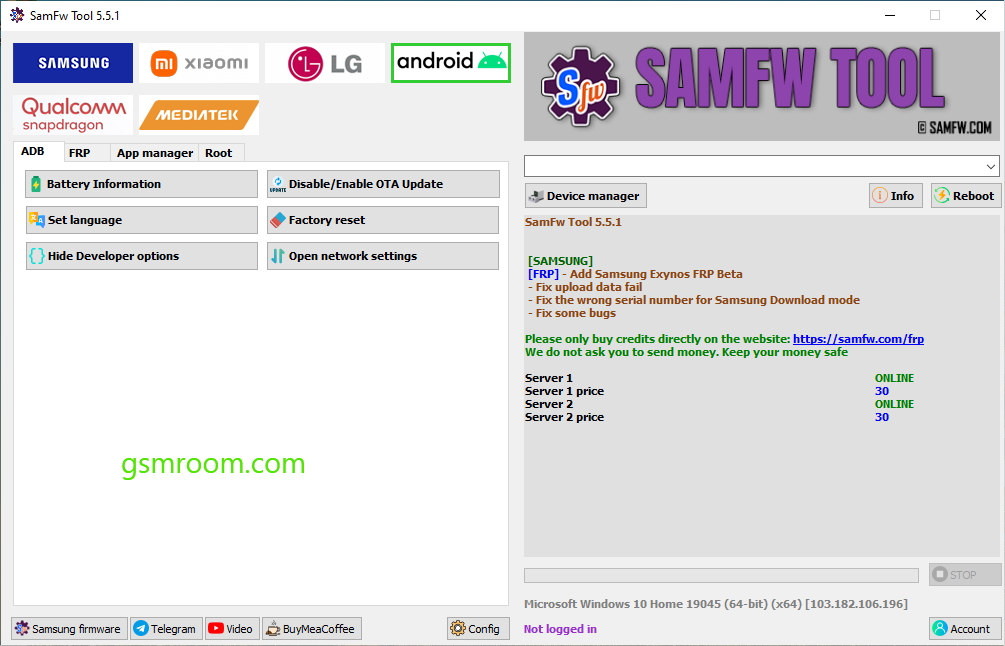
SamFw FRP Tool V5.5.1 is a Windows-based Android servicing utility mainly designed for Samsung smartphones and tablets. The latest version adds updated Android compatibility, improved stability, and support for newer Samsung security patches and Android 16 devices.
The tool is commonly used by mobile technicians for:
- Device information reading
- ADB functions
- Samsung maintenance
- Firmware utilities
- Fastboot operations
- Android diagnostics
Always use Android servicing tools only on devices you own or are authorized to repair.
What is SamFw FRP Tool?
SamFw Tool is a lightweight Samsung Android utility that combines several servicing and maintenance functions into a simple interface. It is widely known in GSM repair communities for Samsung-related Android operations.
The software supports:
- Samsung Galaxy devices
- Some Xiaomi devices
- Qualcomm and MediaTek platforms (limited functions)
Main Features of SamFw FRP Tool V5.5.1
🔹 Samsung Device Support
The tool supports many Samsung smartphones and tablets.
Supported Series
- Galaxy A Series
- Galaxy M Series
- Galaxy S Series
- Galaxy Note Series
Compatibility depends on Android version and security patch level.
🔹 ADB Functions
ADB features may include:
- Device detection
- Reboot commands
- Device information
- Application management
- USB debugging communication
🔹 Fastboot Utilities
Fastboot support includes:
- Reboot to Fastboot
- Recovery reboot
- Device diagnostics
- Bootloader communication
🔹 Device Information Reader
Users can read:
- Model number
- Android version
- Build number
- Security patch level
- CSC information
🔹 Firmware Utilities
The tool may also support:
- Firmware flashing assistance
- CSC change utilities
- System maintenance
- Factory reset functions
What’s New in Version 5.5.1?
According to recent release notes, version 5.5.1 includes:
✔ Android 16 Support
Improved compatibility for newer Samsung Android devices.
✔ Better Samsung Exynos Support
Enhanced Exynos compatibility and communication.
✔ Faster Device Detection
Improved ADB and USB communication speed.
✔ Stability Improvements
Reduced crashes and connection errors.
✔ Updated Interface
Cleaner and easier-to-use dashboard.
Installation Guide
Step 1: Download the Package
Download the latest ZIP archive.
Step 2: Extract Files
Use:
- WinRAR
- 7-Zip
- WinZip
Step 3: Install Drivers
Install:
- Samsung USB Drivers
- ADB Drivers
- Fastboot Drivers
Step 4: Run as Administrator
Launch the tool with administrator privileges.
Advantages of SamFw Tool
✔ Lightweight Software
Runs smoothly on most Windows PCs.
✔ Beginner-Friendly Interface
Simple layout suitable for technicians and beginners.
✔ Fast Device Communication
Quick ADB and Samsung detection.
✔ Multi-Function Utility
Combines several Android servicing functions into one tool.
✔ Free Utility
Popular free Samsung servicing software.
Common Problems and Fixes
Device Not Detected
Solutions
- Reinstall Samsung USB Drivers
- Change USB cable
- Use another USB port
- Restart the PC
ADB Not Working
Fixes
- Enable USB Debugging
- Restart ADB services
- Reconnect device
- Update drivers
Tool Crashing
Solutions
- Run as Administrator
- Update Windows
- Install Visual C++ Redistributables
- Temporarily disable conflicting antivirus software
Conclusion
SamFw FRP Tool V5.5.1 Free Download [Latest Version] is a popular Samsung Android servicing utility used for ADB communication, diagnostics, firmware-related operations, and device maintenance. The latest version improves Android 16 compatibility, Samsung Exynos support, and overall performance.
Its lightweight design, easy interface, and broad Samsung support make it a widely used tool among Android technicians and advanced users in 2026.







