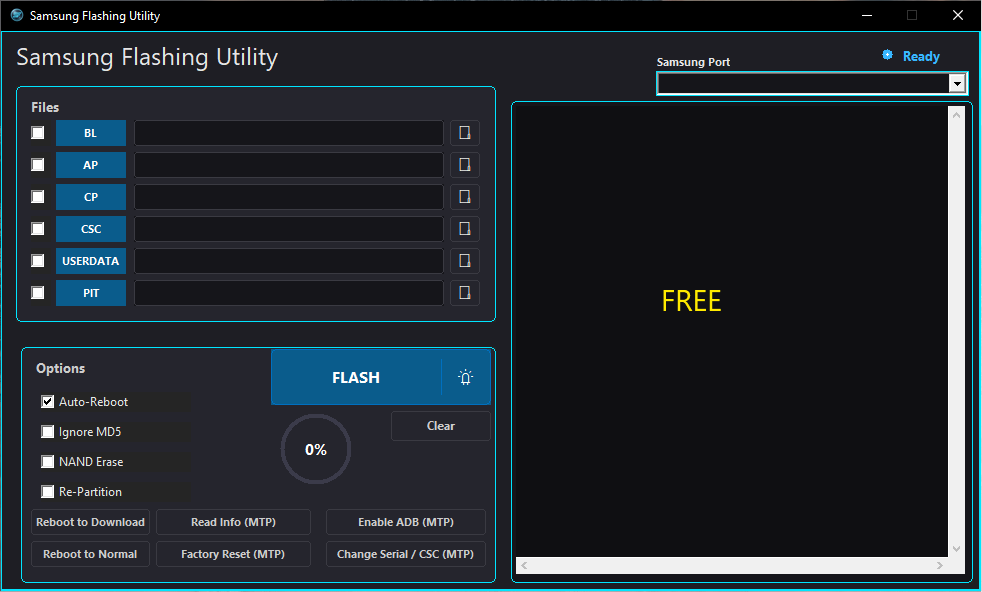
The Samsung Flashing Utility is a powerful Windows-based software designed for flashing official Samsung firmware, updating software, restoring stock ROM, and performing maintenance on Samsung Galaxy smartphones and tablets. It provides a simple interface that allows technicians and advanced users to install compatible firmware safely and efficiently.
Whether you’re fixing software issues, reinstalling the operating system, or upgrading firmware, the Samsung Flashing Utility offers a reliable solution for Samsung device management.
What is Samsung Flashing Utility?
Samsung Flashing Utility is a firmware installation tool that communicates with Samsung devices in Download Mode. It enables users to flash official Samsung firmware packages and restore devices to factory software.
The utility is commonly used for:
- Flashing official Samsung firmware
- Installing software updates
- Restoring stock ROM
- Recovering devices with software issues
- Device diagnostics
- Software maintenance
Main Features
Official Samsung Firmware Support
The utility supports flashing firmware components including:
- BL (Bootloader)
- AP (System)
- CP (Modem)
- CSC
- HOME_CSC
Fast Device Recognition
Once connected, the tool can display:
- Device Model
- Firmware Version
- COM Port
- Connection Status
- Binary Version
Wide Samsung Device Compatibility
Supports a wide range of Samsung Galaxy devices, including:
Galaxy S Series
- Galaxy S21
- Galaxy S22
- Galaxy S23
- Galaxy S24
- Galaxy S25
Galaxy A Series
- Galaxy A14
- Galaxy A15
- Galaxy A24
- Galaxy A34
- Galaxy A54
- Galaxy A55
Galaxy M Series
- Galaxy M14
- Galaxy M34
- Galaxy M54
Galaxy F Series
- Galaxy F14
- Galaxy F34
- Galaxy F54
Android Version Support
Compatible with many Samsung devices running:
- Android 11
- Android 12
- Android 13
- Android 14
- Android 15
- Android 16
Simple User Interface
The software provides:
- Easy firmware loading
- Flash progress bar
- Log window
- Device information panel
- Clean navigation
How to Download Samsung Flashing Utility
To get started:
- Download the latest Samsung Flashing Utility from a trusted source.
- Extract the ZIP or RAR archive.
- Install the latest Samsung USB Drivers.
- Launch the utility as Administrator.
- Boot the Samsung device into Download Mode.
- Load the appropriate firmware files.
Installation Guide
Step 1
Extract the downloaded archive.
Step 2
Install Samsung USB Drivers.
Step 3
Run the Samsung Flashing Utility.
Step 4
Connect your Samsung device via USB.
Step 5
Load the firmware files into the correct sections:
- BL
- AP
- CP
- CSC
- HOME_CSC
Conclusion
The Samsung Flashing Utility is an essential tool for Samsung firmware installation, software recovery, and system maintenance. With support for a wide range of Galaxy devices, official firmware packages, and modern Android versions, it provides a dependable solution for technicians and experienced users.
By using the correct firmware, installing the latest Samsung USB drivers, and following the recommended procedures, you can safely restore or update your Samsung device with confidence.







