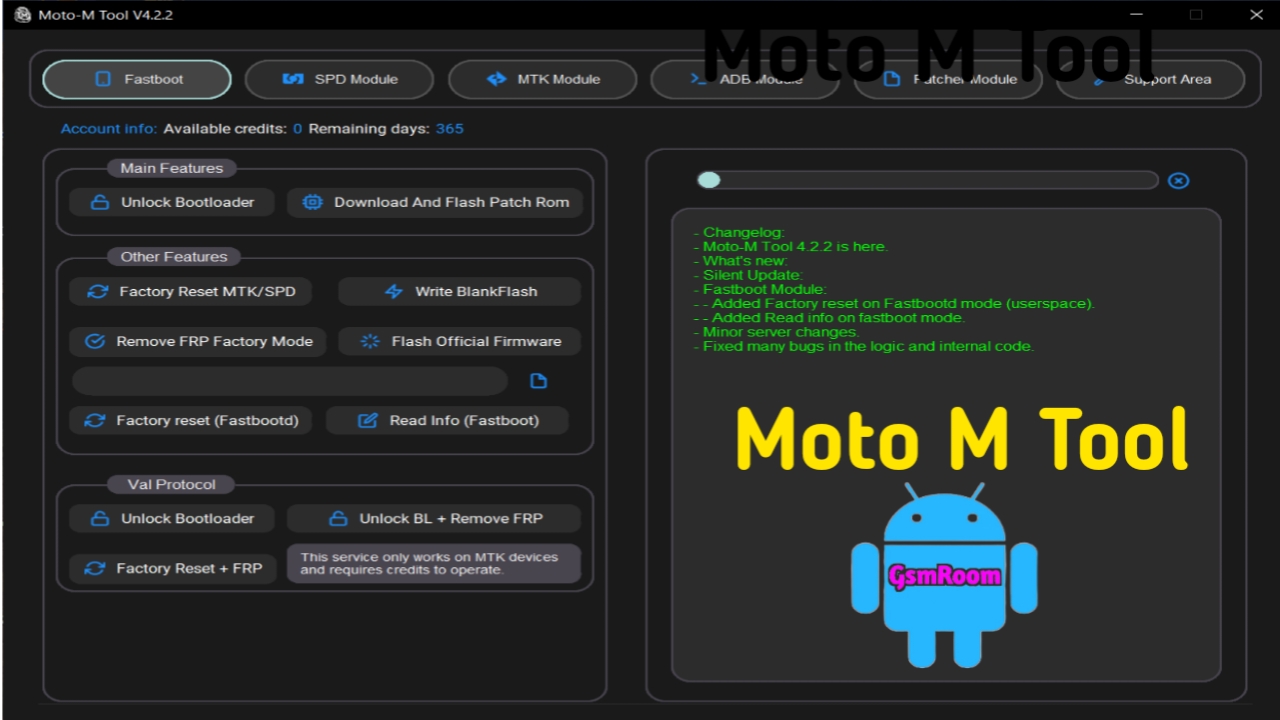
The Moto-M Tool is a Windows-based Android servicing utility designed for Motorola smartphones. It helps mobile repair technicians and advanced users perform software maintenance, device diagnostics, firmware management, and other supported service operations. The latest 2026 version offers improved compatibility with newer Motorola devices, a cleaner user interface, and enhanced performance.
Whether you need to install official firmware, read device information, or troubleshoot software-related issues, Moto-M Tool provides a convenient platform for Motorola device servicing.
What is Moto-M Tool?
Moto-M Tool is a professional utility developed for servicing Motorola Android smartphones. It supports various connection modes, allowing users to communicate with compatible devices for maintenance and software management tasks.
The software is widely used by:
- Mobile Repair Technicians
- Smartphone Service Centers
- Android Developers
- Advanced Motorola Users
- Repair Shop Owners
Moto-M Tool Latest Version Features
1. Motorola Device Detection
Moto-M Tool automatically detects connected Motorola smartphones and displays useful information such as:
- Device Model
- Android Version
- Firmware Version
- Serial Number
- Build Number
- Bootloader Status
2. Firmware Flashing Support
The tool supports firmware management functions for compatible Motorola devices, including:
- Flash Stock Firmware
- Firmware Verification
- Firmware Backup
- Restore Firmwar
3. Device Information Reader
- Model Number
- Software Version
- Android Build
- Security Patch Level
- Hardware Information
4. Bootloader Management
The latest version includes support for bootloader-related functions on compatible devices, such as:
- Check Bootloader Status
- Unlock Bootloader (where officially supported)
- Relock Bootloader
- Fastboot Commands
5. Fastboot and ADB Support
Moto-M Tool supports common Android service modes, including:
- ADB Mode
- Fastboot Mode
- USB Mode
6. Modern User Interface
The updated interface includes:
- Easy navigation
- Clean dashboard
- Organized tool categories
- Fast response
- Simple workflow
Supported Motorola Devices
Moto-M Tool supports many Motorola smartphones, including:
Moto G Series
- Moto G14
- Moto G24
- Moto G34
- Moto G54
- Moto G64
- Moto G84
Moto E Series
- Moto E13
- Moto E14
- Moto E22
- Moto E32
Motorola Edge Series
- Motorola Edge 40
- Motorola Edge 50
- Motorola Edge 50 Pro
- Motorola Edge 50 Fusion
Moto Razr Series
- Motorola Razr (selected models)
How to Download Moto-M Tool
To download the latest version:
- Download the Moto-M Tool package from a trusted source.
- Extract the ZIP or RAR archive.
- Install Motorola USB Drivers.
- Launch the application as Administrator.
- Connect your Motorola smartphone using a USB cable.
Always verify that you are using the latest version for the best compatibility.
How to Install Moto-M Tool
Step 1
Extract the downloaded archive using WinRAR or 7-Zip.
Step 2
Install the latest Motorola USB Drivers.
Step 3
Run the setup file or executable as Administrator.
Step 4
Launch Moto-M Tool.
Step 5
Connect your Motorola device in the appropriate service mode (such as ADB or Fastboot) based on the task you want to perform.
What’s New in the Latest Version?
The newest Moto-M Tool release includes:
- Improved Motorola device compatibility
- Better Windows 11 support
- Faster device detection
- Updated Fastboot functions
- Enhanced firmware management
- Improved system stability
- Refreshed user interface
- Performance optimizations
Advantages
- Lightweight Windows application
- Easy-to-use interface
- Fast device recognition
- Supports multiple Motorola models
- Firmware management features
- Stable performance
- Regular updates
Important Tips
Before using Moto-M Tool:
- Back up important data before making software changes.
- Install the latest Motorola USB Drivers.
- Use a high-quality USB cable.
- Ensure your device has sufficient battery power.
- Verify firmware compatibility before flashing.
Frequently Asked Questions
Is Moto-M Tool free to use?
Availability and licensing depend on the version and distributor. Some releases may be free, while others may require activation or a license.
Does Moto-M Tool support Windows 11?
Yes, the latest version is compatible with Windows 11 as well as Windows 10, Windows 8, and Windows 7.
Can I flash official Motorola firmware?
Moto-M Tool supports firmware management for compatible devices. Always use firmware specifically designed for your exact Motorola model.
Do I need Motorola USB Drivers?
Yes. Installing the latest Motorola USB Drivers is recommended to ensure stable communication between your PC and the device.
Conclusion
The Moto-M Tool Latest Version (2026) is a practical utility for Motorola smartphone servicing, offering firmware management, device diagnostics, Fastboot and ADB support,







