Mobile servicing software can help technicians organize repair tasks, inspect connected devices, and manage supported maintenance operations. As Android phones become more advanced, repair professionals need reliable tools, compatible drivers, and clear procedures to diagnose problems without putting customer data at risk.
A.N.TOOL v4.6 (LifeTime Free) Download is a search term used by people looking for information about version 4.6 of A.N.TOOL and its reported licensing conditions. Before installing it, however, users should confirm the software’s origin, version number, supported devices
What Is A.N.TOOL?
A.N.TOOL is the name associated with the software discussed in this guide. The exact developer, official website, feature list, and release history for version 4.6 have not been independently confirmed here.
Features AN Tool
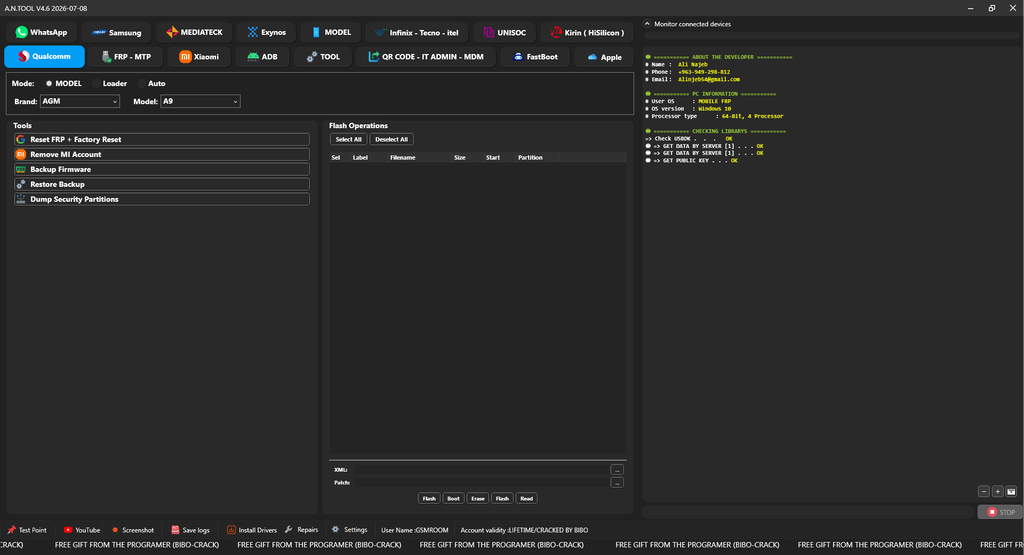
Qualcomm
- Mode Selection: MODEL, Loader, Auto
- Brand and Model Selection
- Tools
- Reset FRP + Factory Reset
- Remove MI Account
- Backup Firmware
- Restore Backup
- Dump Security Partitions
- Flash Operations
- Select All / Deselect All
- Flash / Erase
FRP-MTP
- MTP OPEN TOOL
- ENABLE ADB CODE
- Reset FRP [ADB]
- Open Chrome
- Open YouTube
- Open Google Maps
ADB
- Generic
- Xiaomi Enable Diag [No Root]
- Bypass [FRP]
- Read Info
- Read Partition Table List
- Check Root State
- Get Battery State
- Remove ADS
- Factory Reset [Old Android]
- Fix Wireless Test Assistant [real…]
- Arabic Language Tools
- ADDING THE ARABIC LANGUAGE (ADB)
- ADDING ARABIC Keyboard (ADB)
- Reboot Options
- Recovery
- System
- Power OFF
- EDL [QC]
- META (M…)
- Fastboot
- OTA Options
- Disable OTA
- Enable OTA
QR CODE – IT ADMIN – MDM
- Supported Android 11/12/13/14
- ENABLE ADB QR METHOD 1 [SN]
- ENABLE ADB QR METHOD 2 [SN]
- ENABLE ADB QR METHOD 3 [SN]
- ENABLE ADB QR [AUTO-NO SN]
- ENABLE ADB QR ANDROID 14-15-16 [AUTO-NO SN]
- Test DPC IT Admin QR
- Safe Key IT Admin QR
- Install Shieldx QR
FastBoot
- Main Options Partition Manager – Flash
- SET SLOT [B]
- SET SLOT [A]
- Format Data
- dm-verity failed [Fix]
- Read Info
- Relock Bootloader
- Reboot Recovery
- Exit Fastboot
- Erase FRP
- Reboot Fastbooted
- Partition Manager
- Get Partitions
- ERASE
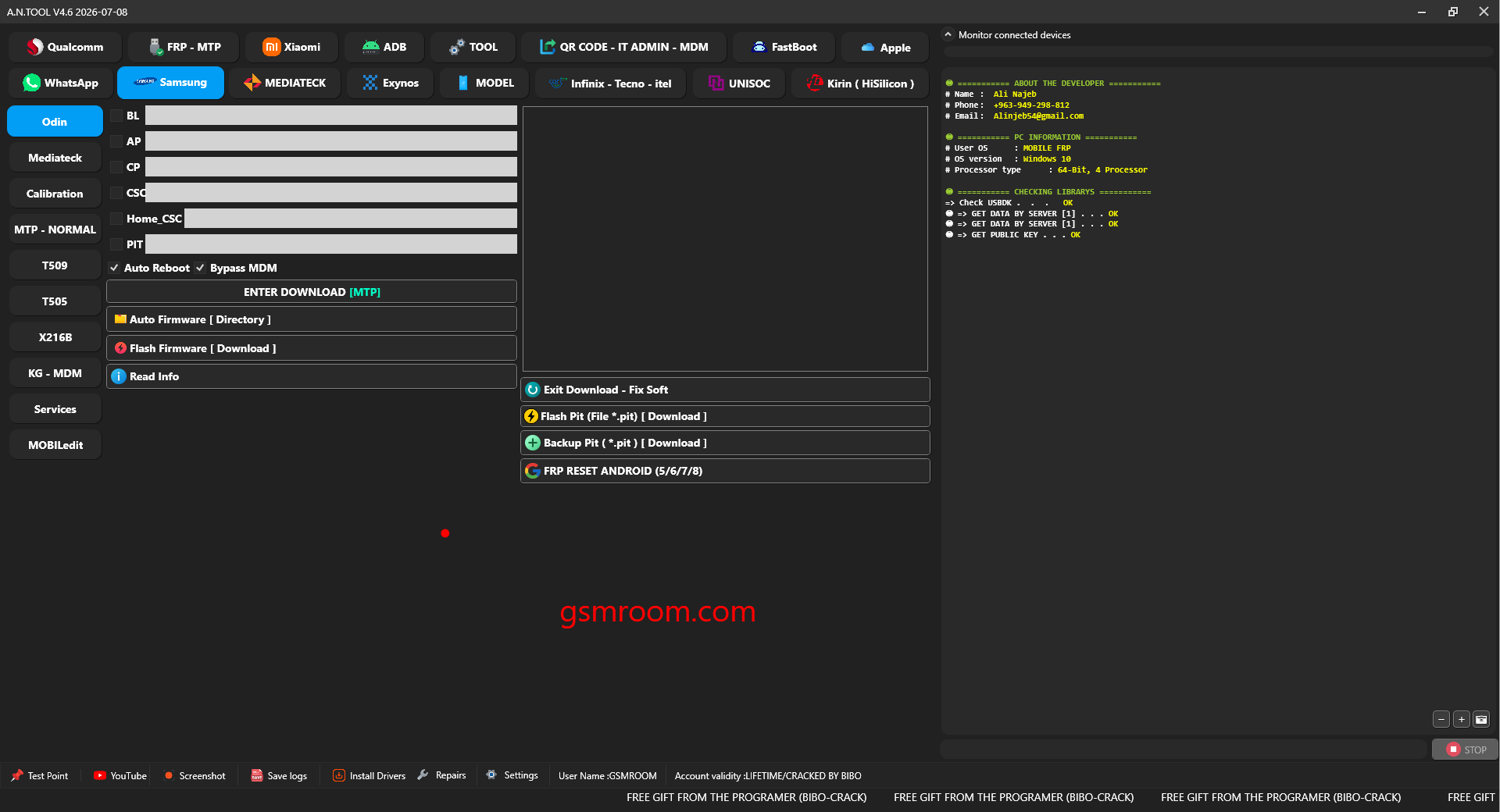
Samsung
- Odin
- BL
- AP
- CP
- CSC
- Home CSC
- PIT
- Auto Reboot / Bypass MDM
- Flash PIT (File.pit) [Download]
- Backup PIT (.pit) [Download]
- FRP RESET ANDROID (5/6/7/8)
- Auto Firmware [Directory]
- Flash Firmware [Download]
- Read Info
Mediateck
- Preloader or BROM: FRP Reset
- Calibration
- Fingerprint Sensor UID
- EFS UID
- Calibration [ADB ROOT]
- Calibration Recovery TWRP (ADB)
- MTP – NORMAL
- TEST MODE / NORMAL
- ENABLE ADB 2023-6-11 [MTP-0]
- Reset FRP [2023-6-11] [MTP-0]
- BYPASS MDM – KNOX KG-FRP [MTP-1]
- Remove FRP Android 16 [2025-12-11] [New-MTP]
- CSC REGION Selection (e.g., EGY – Egypt)
- CHANGE REGION [CSC] [MTP]
- CHANGE SERIAL NUMBER [MTP]
- READ INFORMATION [MTP]
- FACTORY RESET [MTP]
- Fix Bootloader
- Format Remove Google Account
- Remove MDM ROOT
- X216B – BIT B
- X216B – BIT (B-C) NEW
- X216B – BIT A and Old
- Enable Flash Download – EDL 1
- Format Data – Download 2
- Remove MDM – TEMP 3
- KG – MDM
- KnoxGuard [KG]
- Disable KG-MDM LOCK [ADB]
Services
- Remove Samsung Account [ADB]
- FIX FINGERPRINT AFTR ADDING ARABIC [ADB]
- FIX ARABIC SETUP [ADB]
- Delete ARABIC [ADB]
- OTA Options: Disable / Enable
- MOBILedit
- Reset FRP (ADB-ROOT)
MEDIATEK
- Options
- OLD Phone / Preloader [new]
- Using Custom EMI (Preloader)
- Using Custom AUTH
- Using Custom DA (Download Agent)
- Using Xiaomi Protocol
- Auto Preloader to BROM
- BROM (Using old devices)
- One Click
- Relock Bootloader
- Unlock Bootloader
- Exit Recovery [Fix]
- Factory Reset [Safe]
- Remove Huawei ID [NEW] BOOT Fastboot mode
- Bypass Auth
- FRP Reset [BROM]
- Meta Mode
- Read Info
- Factory Reset [Erase]
- Factory Reset [eMMC-New OS (1)]
- Factory Reset [Android Phone 5G]
- Factory Reset [OPPO – VIVO]
- Factory Reset [VIVO y1s-y30]
- Factory Reset [Rebuild Userdata]
- Factory Reset [eMMC – New OS (2)]
- Factory Reset [UFS]
- Factory Reset [UFS – Android 10/11]
- Partition Manager
- Writing Selected
- Erase Selected
- Backup Selected
- Booting Storage
- Backup/Restore
MODEL
- All MODELS
- Samsung
- OPPO
- Huawei
- Honor
- Infinix
- TECNO
- Nokia
- Kirin
- Unisoc
- AGM
- ASUS
- Alcatel
- Astel
- Benco
- CMDC
- Coolpad
- Doogee
- Geely
- Gionee
- Hisense
- K-Touch
- LG
- LeEco
- Lenovo
- Meizu
- Micromax
- OnePlus
- TCL
- VIVO
- Wiko
- Wileyfox
- ZTE
- realme
- motorola
A.N.TOOL v4.6 may be of interest to people researching Android servicing utilities, but a reliable download decision requires more than a version number and a promotional promise.
Before proceeding with an A.N.TOOL v4.6 (LifeTime Free) Download, verify the publisher, licensing terms, system requirements, supported devices, and authenticity of the installation file. Prepare your computer, use trusted drivers, back up important data, and follow documented procedures for every repair task.
Password:- gsmyogesh.com