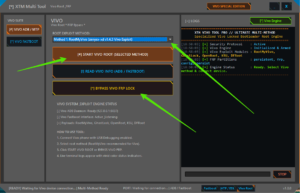
The XTM Multi Tool Vivo Special Latest Version 2026 is a mobile servicing utility designed for technicians and users who work with supported Vivo smartphones. Mobile repair professionals often need specialized software to identify devices, communicate with Android systems, diagnose connection problems, and perform authorized servicing operations.
XTM Multi Tool Vivo Special is a tool name associated with Vivo-focused mobile servicing. Depending on the released version, available functions may include device information reading, ADB communication, USB connectivity checks, and other supported maintenance operations.
In this guide, we cover the available information about XTM Multi Tool, its potential features, installation requirements, compatibility considerations, and safe usage practices.
Note: Exact version details, supported models, and working functions should be confirmed through the original developer’s release notes. We do not claim unverified features as tested or guaranteed.
What Is XTM Multi Tool Vivo Special?
XTM Multi Tool Vivo Special is intended for users interested in Vivo smartphone servicing and Android device management.
Vivo smartphones use different chipsets, Android versions, security patches, and hardware configurations. Because of these differences, a servicing utility may support certain models or operations while excluding others.
XTM Multi Tool Vivo Special Latest Version Features
Below are important areas users should check before installing the software.
1. Vivo Device Compatibility
The main focus of the Vivo Special edition is Vivo smartphone compatibility. However, compatibility should always be checked against the exact model number and software version.
2. ADB Connectivity
Android Debug Bridge (ADB) is a standard Android communication interface. When USB debugging is enabled and authorization is granted, compatible software can communicate with the connected device.
3. USB Device Detection
USB detection is an important part of smartphone servicing. A suitable utility should identify a properly connected device and help technicians troubleshoot connection problems.
4. Device Information
Depending on the available functions, a mobile servicing utility may provide information about a connected smartphone, such as its model or connection status.
5. Windows Compatibility
Windows-based servicing applications generally require suitable drivers and system permissions. Users should check the developer’s documentation for supported Windows editions.
6. Technician-Friendly Interface
A well-organized interface can make common servicing operations easier to understand. Users should carefully read each operation before executing it.
Vivo Special Supported Devices
- Vivo Y Series
- Vivo V Series
- Vivo X Series
- Vivo T Series
- Vivo S Series
- Selected older Vivo Android smartphones
Requirements for XTM Multi Tool Download
| Requirement | Recommendation |
|---|---|
| Operating System | Windows 10 or Windows 11 |
| RAM | 4 GB minimum recommended |
| Storage | Sufficient free disk space |
| USB Cable | Good-quality data cable |
| USB Drivers | Compatible device drivers |
| Internet | Required if the release uses online services |
| Administrator | Recommended where required |
Advantages of XTM Multi Tool Vivo Special
A dedicated Vivo servicing utility may offer several practical advantages when its functions match the connected device.
- Vivo-focused servicing: Intended for users working with Vivo smartphones.
- Computer-based workflow: Allows supported tasks to be performed through Windows.
- ADB communication: May support standard Android debugging functions.
- USB connectivity: Helps technicians work with compatible connected devices.
- Technician convenience: Can simplify supported maintenance procedures.
The XTM Multi Tool Vivo Special Latest Version Download (2026) is a topic of interest for Vivo smartphone technicians and Android servicing enthusiasts. Before installing the software, users should verify its latest release, supported devices, Windows compatibility, and available functions.
A reliable download source, correct USB drivers, and proper device identification are essential for a safe servicing experience.
Always use authorized tools and follow the developer’s instructions. Avoid unverified downloads and operations that could damage a smartphone or compromise its security.
Download Information: The official download link and verified release details have not been provided here. Add the developer’s genuine download link only after confirming the file’s authenticity and version.
Disclaimer: This article is intended for educational and informational purposes. Use mobile servicing software only on devices you own or have explicit authorization to service. We do not host or distribute copyrighted software, modified applications, or unauthorized activation files.