⭐ Key Features
🔓 FRP Bypass (Google Lock)
- Remove Factory Reset Protection (FRP)
- One-click FRP for supported devices
🔐 Unlock & Security Functions
- Remove screen locks (PIN, pattern, password)
- Bypass MDM / KG lock (supported devices)
- Basic security unlock options
📱 Flashing & Firmware Support
- Flash stock firmware
- Fix bootloop and soft-brick issues
- Restore devices to working condition
🔧 Repair & Service Tools
- Factory reset / format device
- Read device information
- Backup partitions (limited support)
- Enable diagnostic (Diag) mode
⚡ Multi-Mode Support
Supports all major Android connection modes:
- ADB Mode
- Fastboot Mode
- MTP Mode
- EDL Mode (Qualcomm)
- BROM Mode (MediaTek)
📱 Supported Devices
Works with most Android brands:
- Samsung
- Xiaomi / Redmi / Poco
- Oppo / Vivo / Realme
- Tecno / Infinix
Supported chipsets:
- MediaTek (MTK)
- Qualcomm
- Unisoc (SPD)
Features NetGhost
- ADB Commands
- Open Network All
- Reboot Device
- Device Info
- Data Icon
- Open APN
- Reboot Recovery
- Reboot Fastboot
Arabic
- Arabic Android 13 (5.1 UI)
- Arabic Android (9 – 13)
- Arabic Android 8
- Arabic Android 7
- Arabic Android 6
- Fix Arabic
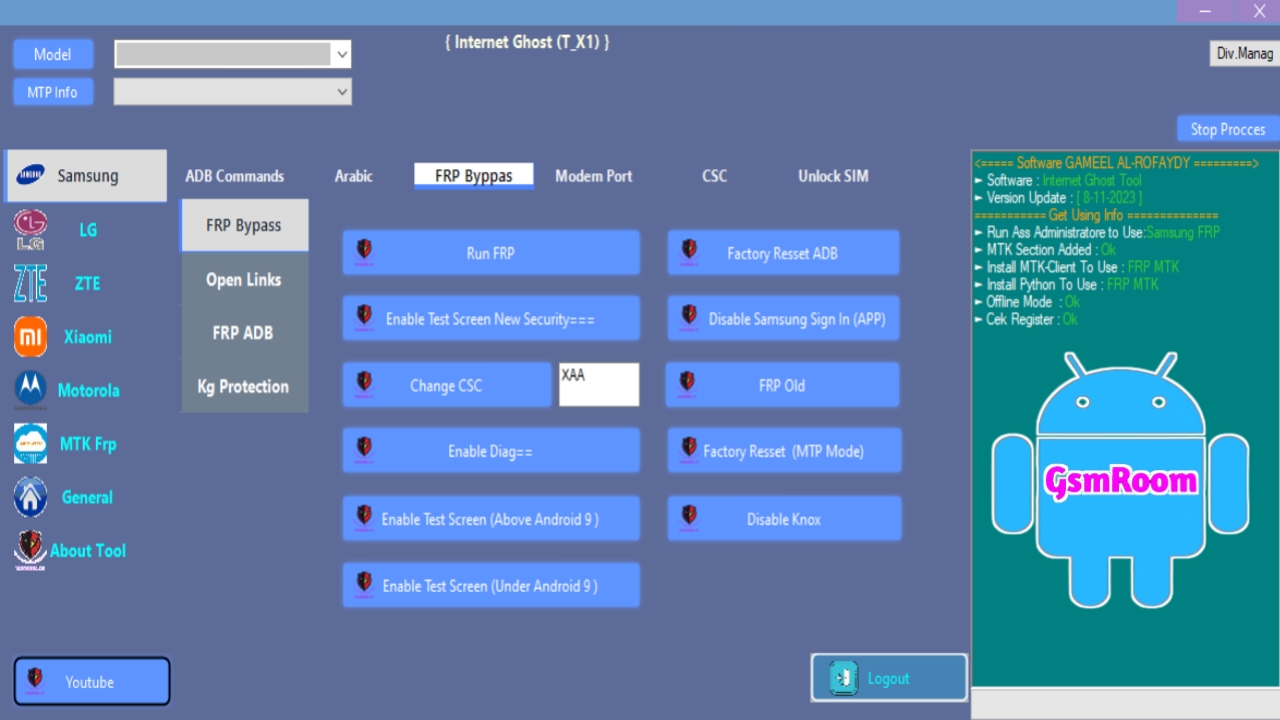
- FRP Bypass
- Run FRP
- Factory Reset ADB
- Enable Test Screen New Security
- Disable Samsung Sign In (APP)
- Change CSC
- FRP Old
- Enable Diag
- Factory Reset (MTP Mode)
- Enable Test Screen (Above Android 9)
- Disable Knox
- Enable Test Screen (Under Android 9)
- Open Links
- Open YouTube
- Open Galaxy Store (Hidden Settings)
- Install Alliance Shield
- Open Google Maps
- Open Samsung Browser
FRP ADB
- Run FRP ADB Mode (New Devices)
- Run FRP ADB Mode (Older Devices)
- KG Protection
- Disable KG Protection
- Modem Port
- Fix 3G Sprint
- Enable Hidden Menu VZW
- Reboot Download Mode
- Reboot Recovery
- Skip Lock Screen
- Format Factory
- Enable Diag
- CSC
- Read Supported CSC
- Disable Convert
- Enable Convert
- Change CSC
- Unlock SIM
- Unlock SIM (China Telecom)
- Unlock SIM (Need Root)
LG General
- Arabic LG (New)
- Open Network All
- Install Shortcut
- Install Keyboard
- Hidden Menu For MTK
- Open APN
- Open Hidden Menu
- Arabic LG (Old)
- Device Info
- Enable Diag Via ADB
- Enable Diag For Old LG
- LG ADB Commands
- Enable Diag (MTK)
- Open APN
- Diag (Hidden Menu)
- Engineer Mode (MTK)
- Band Selection
- MCFG List
- LTE Hidden Menu
- Hidden Menu (MTK)
- LG Repair
- Enable Diag
- Convert To CDMA
- Fix LG Activation
- Fix Network After Convert
- Fix Hand Free Active (Root)
- Convert To GSM
- LG Modem Port
- Open Hidden Menu
- Open Port
- Enable Diag
⚙️ How to Use (Basic Steps)
- Install USB drivers (ADB, MTK, Qualcomm).
- Open the tool as Administrator.
- Connect your Android device via USB.
- Choose function (FRP, Unlock, Flash, Repair).







