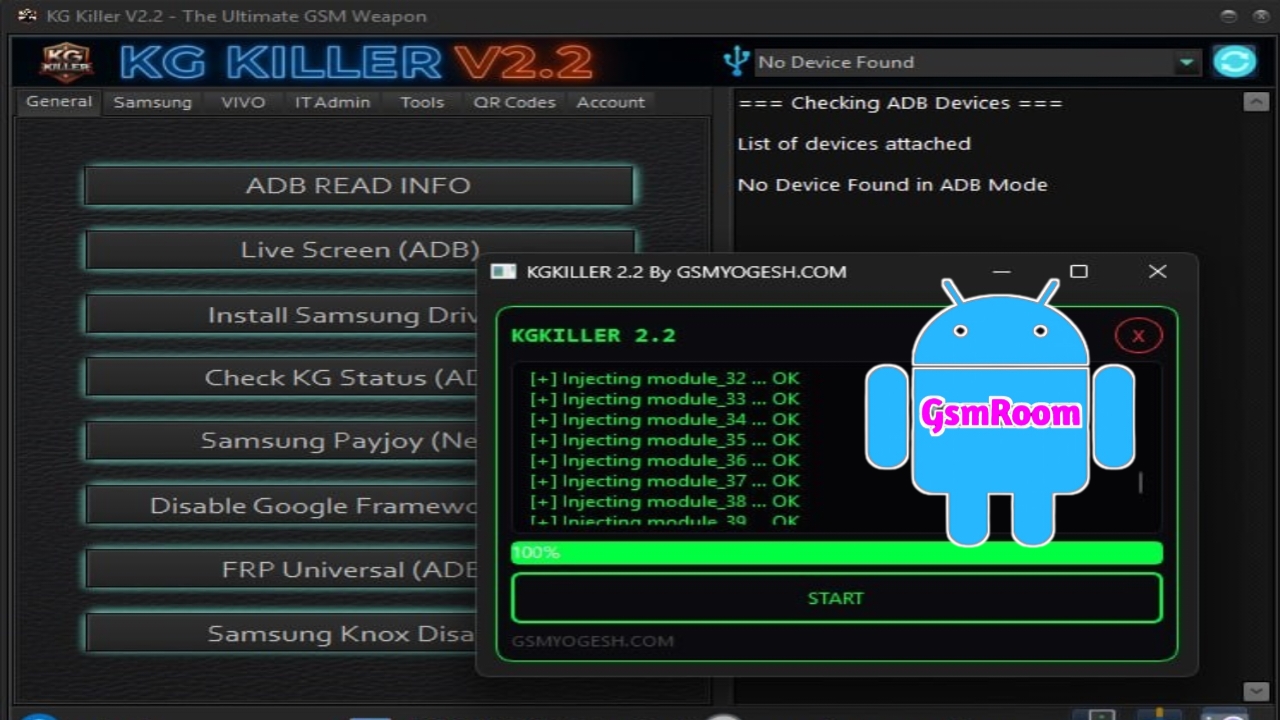
KGKILLER V2.2 is a free Android servicing tool mainly developed for Samsung devices to bypass KG Lock (Knox Guard), FRP lock, and perform basic unlocking operations. This version is popular because it works without login or password, making it quick and easy to use.
📌 What Is KGKILLER V2.2?
KGKILLER Tool is a lightweight Windows-based GSM utility designed to help technicians remove Samsung security restrictions, especially KG Lock, which can block device access after reset or policy restrictions.
It works through multiple modes:
- ADB Mode
- MTP Mode
- Download Mode (Samsung)
Features KG KILLER V2.2
🔹 General
- ADB Read Info
- Live Screen (ADB)
- Install Samsung Driver
- Check KG Status (ADB)
- Samsung Payjoy (New)
- Disable Google Framework APK
- FRP Universal (ADB)
- Samsung Knox Disable
- Hardware Tools
🔹 Samsung (KG / ADB)
- KG Android 15 BETA (APK Method)
- KG Android 14 New Method 1
- KG Android 14 New Method 2
- KG Android 14 New Method 3
- KG Android 14 (All Patch)
- Set To KG Active 01 (IMEI)
- KG Android 13 (New Patch)
- KG Android 13 (03-24)
🔹 Samsung (Tools)
- App Install Fix (Play Store)
- Service Provider Update Fix
- Samsung Account Remove (ADB)
🔹 VIVO
- Vivo FRP Android 15 (ADB) Method 1
- Vivo FRP Android 15 (ADB) Method 2
- Vivo FRP Android 15 (ADB) Method 3
- Software Utilities
🔹 IT Admin
- IT Admin Android 15 (OG)
- IT Admin Android 15
- IT Admin Universal
- IT Admin Hyper OS (Android 15)
- IT Admin (Hyper OS)
- Redmi Android 15 Auto Restart Fix
- IT Admin VIVO (New Security)
- IT Admin (Tecno, Infinix, Itel)
🔹 MDM
- Tecno MDM (ADB)
🔹 Tools
- Samsung Flash Tool
- Sim Unlock (Pixel)
- Disable Factory Reset Method 1
- Disable Factory Reset Method 2
- Disable OTA Updates
- Enable OTA Updates
- Install Samsung Driver
- Developer Option Hide
- Consumer Electronics
🔹 QR Codes
- ADB Enable QR 14 Method 1
- ADB Enable QR 14 Method 2
- ADB Enable QR 13
- Hyper OS QR 1
- Hyper OS QR 2
- IT Admin Universal 1
- IT Admin Universal 2
⭐ Key Features
🔓 KG Lock (Knox Guard) Bypass
- Remove KG Lock / KG State Locked
- Restore device access
- Works on supported Samsung models
🔐 FRP Bypass
- Remove Google FRP lock
- One-click FRP option
- Supports various Android versions (limited support on latest patches)
⚙️ Samsung Utilities
- Enable ADB on locked devices
- Access hidden settings and test mode
- Reboot into different modes
⚡ One-Click Functions
- Simple and user-friendly interface
- Fast execution
- No login or activation required
🆕 What’s New in Version V2.2 (Tested 2026)
- Improved KG Lock bypass success rate
- Better compatibility with newer Samsung security updates
- Faster device detection
- Bug fixes and stability improvements
How to Download
- Visit trusted GSM forums or tool websites.
- Search for “KGKILLER V2.2 Free Tool Tested”.
- Download the ZIP file.
- Extract using WinRAR or 7-Zip.
- Run the tool as Administrator.
⚠️ Always scan downloaded files before installing.
⚙️ How to Use (Basic Steps)
- Install Samsung USB drivers.
- Open KGKILLER Tool as Administrator.
- Connect your Samsung device via USB.
- Select the function (KG bypass / FRP bypass).
📌 Summary
KGKILLER V2.2 (2026 Tested Version) is a simple and effective free tool for bypassing Samsung KG Lock and FRP without login or password. Its one-click features and ease of use make it a useful tool for mobile technicians.
If you want, I can provide a list of the latest Samsung KG bypass tools (2026) with higher success rates.







