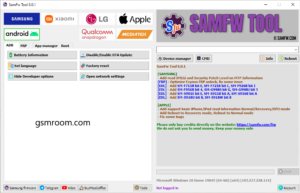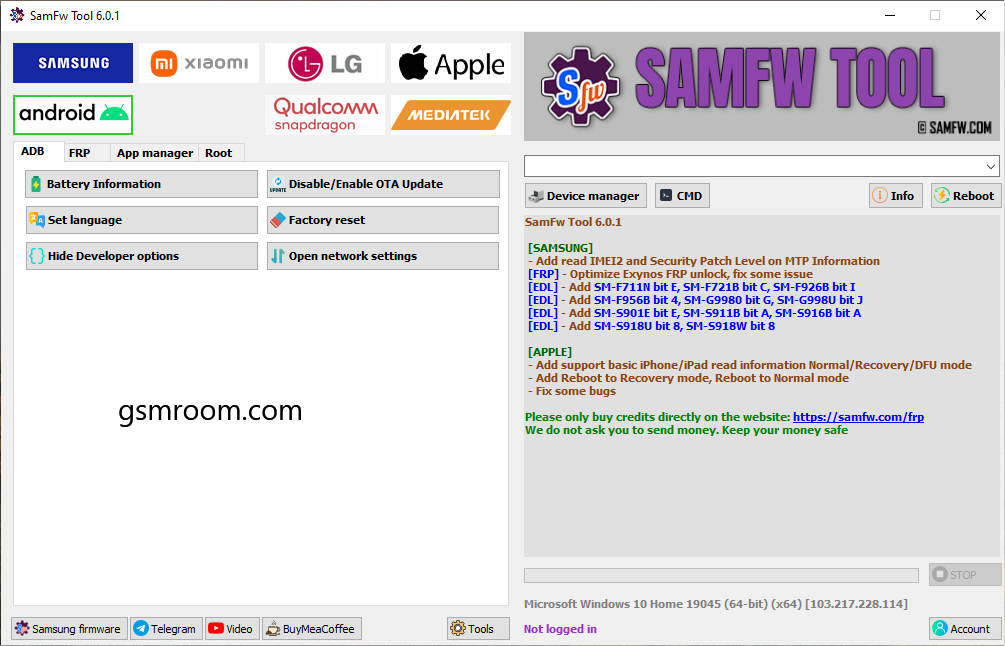
SamFw FRP Tool V6.1 is a Windows-based Android and Samsung servicing utility developed by the SamFw team. The official SamFw changelog documents version 6.0 with improvements to Samsung Exynos FRP servicing, additional EDL device support, and new device-information options such as IMEI2 and security-patch-level reading.
Samsung
FRP
- Remove FRP Server 1 (Exynos CPU Only – Beta)
- Remove FRP Server 2 (Android 16)
- Remove FRP (Security Older Than August 2022)
- Remove FRP (August 2022 – December 2022 Security)
- Remove FRP (USA Models 2024)
MTP
- Factory Reset
- Enable Secret Code for Verizon
- Disable Factory Mode
- KG Unlock (Untested)
- Change CSC
- Factory Reset (Test Mode)
- Disable Knox (Test Mode)
ADB
- Valid / Change SN (Beta)
- Remove Samsung Account
- Enable Mobile Data Toggle
- Remove FRP
- Block Change CSC When Change SIM
- [ROOT] Change CSC
- [ROOT] Change CSC (Manual)
MTK
- Factory Reset
- Format Userdata
- Remove FRP
- Unlock Bootloader
- Relock Bootloader
- Download Mode
- Softbrick Fix
- Factory Reset
- FRP Android 5/6 (Method 1)
- FRP Android 5/6 (Method 2)
Download Mode
- Softbrick Fix
- Factory Reset
- FRP Android 5/6 (Method 1)
- FRP Android 5/6 (Method 2)
- Odin
- BL Flash
- AP Flash
- CP Flash
- CSC Flash
- DATA Flash
- Check MD5
- NAND Erase
- Auto Reboot
- EDL (QC9008)
- Factory Reset
- Remove FRP
- Read Information
Sideload
- Factory Reset
- Remove FRP
- Reset MiCloud Lock
- [QUALCOMM] Bypass MiCloud Lock (Anti Relock)
- [QUALCOMM] Remove Bypass MiCloud Lock
- Read Offline MiCloud Information
Mediatek
- Factory Reset
- Format Userdata
- Remove FRP
- Unlock Bootloader
- Relock Bootloader
- Bypass Auth
- Reset MiCloud Lock
EDL (QC9008)
- Factory Reset
- Remove FRP
- Reset MiCloud Lock
Qualcomm Snapdragon
- EDL (QC9008)
- Connect 9008
- Factory Reset
- Format Userdata
- Remove FRP
- Firehose Loader Selection
- Storage Type Selection
MediaTek
- General Functions
- Factory Reset
- Format Userdata
- Remove FRP
- Unlock Bootloader
- Relock Bootloader
- Bypass Auth
⚡ EDL Support Added
New Supported Samsung Models
- SM-A736B (Bit C)
- SM-F731N (Bit 6)
- SM-F741U (Bit 4)
- SM-F936B (Bit C)
- SM-F946U (Bit 8)
- SM-F956U (Bit 4)
- SM-G990U2 (Bit L)
- SM-G9910 (Bit G)
- SM-S901U (Bit A)
- SM-S906U (Bit A)
- SM-S908E (Bit E)
- SM-S908U (Bit A)
- SM-S926U (Bit 6)
- SM-S928U (Bit 6)
- SM-T737 (Bit 9)
- SM-X218U (Bit C)
SamFw Tool has become a popular utility among mobile technicians because it combines several Android servicing functions into a single application. Depending on the device and software version, the tool provides functions related to Samsung, Qualcomm, MediaTek, ADB, MTP, Download Mode, EDL, and firmware servicing.
If you’re searching for SamFw FRP Tool V6.1 Free Download, this guide explains the latest documented release, features, requirements, installation, troubleshooting, and safe-download recommendations.
Important: Security-related servicing features should only be used on devices you own or are explicitly authorized to repair. FRP is an Android security mechanism intended to protect user accounts and devices.
What Is SamFw FRP Tool?
SamFw Tool is a Windows servicing application created by the SamFw team. SamFw itself began in 2019 as a Samsung firmware platform and has expanded into firmware information, device tools, and other mobile-service resources.
SamFw Tool V6.1 Latest Version
The official SamFw changelog includes a dedicated SamFw Tool 6.0 section. Version 6.0 adds new Samsung device-information capabilities and improves several existing servicing functions.
What’s New in V6.1?
According to the official changelog, SamFw Tool 6.0 includes:
- Read IMEI2 through MTP information
- Read security patch level through MTP information
- Optimized Samsung Exynos FRP functionality
- Fixes for Exynos FRP-related issues
- Additional Samsung EDL device support
- General improvements and bug fixes
SamFw FRP Tool V6.0 is a substantial update to the SamFw mobile servicing utility. The official changelog documents improvements to Samsung Exynos FRP functionality, new IMEI2 and security-patch information through MTP, and additional Samsung EDL device support.
Disclaimer
This article is for educational and informational purposes. SamFw and Samsung are separate entities. FRP and other device-security features exist to protect devices and user accounts. Use servicing functions only on devices you own or have explicit authorization to repair. Always follow applicable laws, manufacturer policies, and account-recovery procedures.